Mutiny BIM: I modelled a scan-sized room in it, exported the IFC 4.3, and raced two editors on one wall
mdjsonmcp2026-11-12 · 26 min · bim · mcp · agents · cad · point-cloud · 3d
A 4:48 narrated explainer, drawn in code. Every number and picture in it is this article's own; the sources are below.
› transcript
A scan becomes a room of walls. Then a person and an agent both edit the same wall, at the same moment. Who wins? Hi, I'm Corvina! I ran Mutiny BIM, modelled a room shaped like a scan's output, through an agent, and raced editors on one wall. Chapter one. A wall is a record. Every element is a plain record. A wall is a start point, an end point and a height, stored in millimetres. It has a thickness and a type. Its class, arch dot wall, comes from the architecture add-on, not from the kernel. A partition places it by level, zone and discipline. And it keeps a version, plus a ledger of which fields someone wrote on purpose. That ledger decides every conflict later. A scan pipeline emits geometry, so here that output is a script: walls two hundred and thirty millimetres thick, a slab, a door, a window and a duct. The preview runs it and saves nothing. Seven edit steps, with quantities a person can check against the scan. Then the server asks a person. My first client answered without saying yes, and nothing landed. With approval, thirteen records commit as one revision and one undo step, and every open editor sees them arrive. Exported, the room is a valid IFC four point three file of two hundred and eighty nine entities. Chapter two. The agent's loop. The agent writes one script against the kit, and the server checks it. Running it gives a preview: what would change, the quantities, and a hash of the output. Nothing is saved yet. A person sees that preview and approves it. The agent cannot answer for them. Then the server re-runs the script, lands only what matches the preview, and commits it. That keeps the agent's context small. The core lists ten tools. With every add-on family on, it lists a hundred and sixty eight. Here is that loop landing. The first room is already in the plan. My client sends a second one, and approves it. It appears in an open browser session the moment it commits. Chapter three. Two editors, one wall. Each command tells the server which fields it wrote on purpose. A wall move records its start and its end. That is the ledger the server checks. Two people move the same wall from the same revision. The second move is re-run on the new head, writes start differently, and is refused by name. Now Priya sets the thickness to three hundred millimetres. The thickness command records no field at all. A second person sets two hundred and fifty on the same base. There is nothing to compare, so both commit and the later one wins, silently. So the doc's promise, no last write wins on intent, holds for moves, for people and agents. For thickness, not yet. Chapter four. What the IFC carries. An open source IFC checker found the room's file valid. Reading it entity by entity, the gaps are plain. Walls and the slab are extruded boxes. There are no materials and no common property sets. Each wall runs from its start to its end on its centre line, so every outer corner of the room is missing a small square. The room is an IFC space with its net floor area, and no shape a viewer can draw. And the duct's size lives only in its profile, with no property and no flow. The maintainers show what a bigger script can make: plans, a single line diagram and a switchboard schedule, from one assistant's script. That video walks through the finished model. In my run, the repository's own examples did the same at a smaller scale. Chapter five. Where a scan fits. Mutiny takes no point cloud. It is where fitted elements land. A fitting stage turns the cloud into wall lines, openings and a floor outline. It writes them as a script, passing every measured dimension, because the defaults are in feet. A person checks the preview against the scan and approves it. The walls land as existing conditions, locked, and design work happens on top of them. So use Mutiny as the shared model an agent edits through approvals. Not yet as the IFC you hand over. To recap. One script, one preview, one approval. Conflicting moves are refused by name, but thickness overwrites. And a valid IFC that is thin on data. Every source is in the full article. I'm Corvina. Bye!
Why read this
Hightop 30%Runs Mutiny BIM end to end: a scan-shaped room through MCP, the IFC 4.3 read entity by entity, and seven commit races that find a last-write-wins gap.
- Checked against the source
- Runs on a laptop CPU
- A new technique
3D & spatialApache-2.0Practitioner tool
How this was scored
- Is it new?
- 2 of 3: A real new idea, method or capability
- Can I trust it?
- 3 of 3: Reproduces the headline result, or shows from primary files it is wrong
- Can I run it?
- 3 of 3: Open, permissive, runs on reader hardware with instructions
- Will I understand it?
- 2 of 3: Mechanism from first principles with figures
- Can I act on it?
- 2 of 3: A concrete recipe, numbers or comparison
- Will it last?
- 1 of 3: Relevant for months
- Does it affect many?
- 1 of 3: A specialist community
- Only here?
- 2 of 3: A teardown or measurement few others did
Score 72 of 100, ranked 99 of 740 rated articles. Each question is answered 0–3 by hand, and a 3 is rare. How articles are scored
My roundup of 3D and BIM tools for agents read Mutiny BIM from its source and placed it on a capture-to-IFC pipeline. It explained the commit rule step by step, the trade-word ratchet in the kernel and the 250k performance budgets. I did not run any of it then. This piece is the run.
The question I care about is narrow. I turn 360 and fisheye walks into point clouds, and point clouds into building models. If a scan-to-BIM step hands Mutiny a room as elements, what does the kernel store, what reaches the IFC file a reviewer opens in another tool, and what happens when a person and an agent both touch the same wall? There was no capture behind this run. I made up one room with the dimensions and fields a fitting stage would hand over, modelled it the way a scan would describe it, landed it through the MCP tool server with an approval, exported it, read the export with IfcOpenShell, and raced editors against the commit server until something gave.
Something did. Wall moves are protected exactly as the docs say. Wall thickness is not, and by the code, neither are element parameters.
What I ran, and on what
Mutiny BIM is Apache-2.0, maintained by PermitZIP, who announced the repository on 9 November and posted a demo video two days later. I used commit 94513ba (11 November), the same one the roundup read.
Open-source building model engine. One shared kernel, trade add-ons, and a script-first tool server so people and AI agents can edit the same model together.
- license
- Apache-2.0
- branch
- main
- forks
- 8
- open issues
- 37
- source
- 23.7 MB
- commit date
- 2026-11-11
GitHub REST API, 2026-11-12 — branch, commit, commitDate, createdAt, description, forks, homepage, languages, license, openIssues, pushedAt, stars, topics
Everything ran in a throwaway node:22-bookworm container on a shared 16-core Linux server, capped at 3 CPUs and 4 GB, with its ports bound to localhost and reached from my Mac over an SSH tunnel. A headless Chromium on the Mac drove the editor for the screenshots and clips. IfcOpenShell 0.9.0 ran locally in a scratch virtualenv. When I finished, the container, its image and the work directory were removed.
The install is unremarkable in the good way. npm ci took 13.5 s and left 578 MB of node_modules. npm run demo built the browser editor in 5,489 ms (10.64 MB of JavaScript in 584 files, by its own log line) and served an in-memory model on port 3095. No database, no sign-in. The full stack with Postgres exists as a docker compose file, but it binds ports that were taken on that host, and the dev server runs the same commit code, so I stayed on the dev server.
I ran three of the test paths that matter here, packages/bim-ifc, packages/bim-sync and the kernel's top-level __tests__: 68 suites and 305 tests passed, one of each skipped, in 62.7 s on two workers. The repository has 849 test files; I did not run the rest.
A wall is a record
Start from what the kernel stores, because everything else (the editor, the MCP tools, the IFC writer, the commit server) is a reader or writer of these records.
A model is ModelState: a revision number, a map of elements by id, the connections between them and a few settings. Here is one wall from my run, exactly as the kernel wrote it to scan-room.model.json:
{
  "id": "wall-c4231333641e772e-1", "kind": "wall", "version": 1, "authoredRev": {},
  "start": { "x": 0, "y": 0 }, "end": { "x": 6240, "y": 0 },
  "thickness": 230, "height": 3000, "wallType": "Wall",
  "placement": { "kind": "line", "levelId": "level-57969c4ac4423c11",
                 "lateral": "center", "vertical": "bottom", "startOffsetMm": 0, "endOffsetMm": 0 },
  "classId": "arch.wall", "classSource": "recognised",
  "partition": { "level": "Scan L1", "zone": "Z1", "discipline": "architecture" },
  "schemaVersion": 2
}
Three of those fields do the work in what follows.
version counts how many committed changes have touched this element. authoredRev maps a field name to the revision in which a person or agent last wrote it on purpose. After my races, the walls I moved carried {"start": 23, "end": 23}, and the ones whose thickness I changed carried nothing for thickness at all. Hold that thought; it decides the race results.
partition places the element in a level, a zone and a discipline, so a client can load only the areas it needs. classId is how a trade add-on recognises it: arch.wall comes from the architecture pack, not from the kernel.
Units. Lengths are stored in millimetres as plain numbers, and every parameter names a quantity kind. packages/bim-units defines ten base dimensions: the seven SI ones plus plane angle, counted items and currency, which "physics calls dimensionless but a model must not mix". On top of those sit 53 quantity kinds and 151 unit codes. The point of kinds is in the source comment: drainage fixture units and supply fixture units are both dimensionless, and inches of water and psi are both pressure, "but a model never adds supply fixture units to drainage fixture units; kinds make that a type error and a refused formula". For anyone who has merged a survey in metres with a design in feet and inches, that is the right instinct.
It also leaks. I asked for a supply duct in metric (600 cfm, 200 mm deep) and the mechanical pack's sizing read answered with a 406.4 by 200 mm duct at 686 fpm: 406.4 mm is 16 inches, picked from an imperial size list. The preview described it as "+13 ft of 16"x7⅞" duct". The arithmetic holds: 600 cfm through 16 by 7.87 inches (0.875 ft²) is 685.8 fpm, the velocity the read reported. The kernel is unit-clean; the trade catalogues are American.
Types and parameters. An element can name a type, and a value on the element overrides the type's. The roundup's pack explorer shows that resolution with three records side by side, so I will not repeat it.
Networks. Ducts, pipes and conduit are straight run_segment records joined by run_fitting records, and each end holds a link to what it meets. My duct's first segment ends with "links": {"end": {"elementId": "run-…-f1", "port": "a"}}, and the elbow's port a links back to that segment's end. Flow is a derived value a network adapter walks and totals; my run had no air terminal, so the segment says "flow": 0. Derived values recompute on every commit and never conflict.
Spaces. Nobody draws a room outline. The script gives one point inside, and the kernel traces the enclosure from the walls. My space came back with its outline on the walls' inner faces, (115, 115) to (6125, 4705), and the four walls that bound it. Its area, 6.01 m by 4.59 m, is 27.5859 m², which is the NetFloorArea the IFC file carries to the fourth decimal. That trace-from-a-seed behaviour is exactly what a scan pipeline wants: give it walls and a point per room and it builds the spaces.
Phases and groups. Every element is in a group (General, New work, Demolition) and is created in a phase, optionally demolished in a later one. A phase status is one of new, existing, demolished or temporary. There is also a lock with the state existing: the kernel's summary reads "Locked … as existing conditions", and a locked element refuses edits. For scan-to-BIM this is the most useful field in the kernel. A scanned wall is existing construction, and the people designing against it should not be able to drag it by accident.
Sheets. Views, sheets, viewports, tags and schedules are model records too, so they sync, conflict and undo like walls. They come out as vector PDF through packages/bim-sheets. They do not go into IFC: the exporter's NOT_EXPORTED_KINDS lists view, sheet, viewport, tag, dimension and a few more.
Commits. A change is an intent command, a small JSON object such as move_wall with a wallId and a delta. A script's output is one batch_edits of up to 500 steps, one revision and one undo. The server re-runs every command on its own head and decides. That is planCommit() in packages/bim-kernel/src/changeset.ts, and the races below are about what it compares.
The add-on contract, from a scan pipeline's side
The kernel's stance is that trades are add-ons. A pack is a manifest plus contributions to versioned extension points; the contract is at version 1.13.0, and KNOWN_POINTS in packages/bim-pack/src/points.ts lists 92 of them. The ones a scan-to-BIM pack would touch are few:
kernel.class, for a class such asscan.as_built_wallwith its IFC mapping.kernel.parameter_set, for a deviation-from-cloud parameter, with a unit kind (length) and anifc: { pset, property }home so the exporter writes it with no exporter change.lint.rule, for "this wall sits more than 20 mm off the cloud". Element rules run only on what an edit touched, and a rule lists the other kinds it reads so it re-runs when they change.kernel.ifc_import_rule, to map classes coming in from an IFC that another tool produced.
That is a design I would write, not something in the repository; no pack reads a point cloud today. The contract allows it without kernel edits, and the loading rules are sensible for a pipeline that hands models between teams: a model pins the exact versions of its packs, a host missing one reports it by name and keeps the records, and a host installs a data add-on only after a person approves that exact version, while code add-ons are refused by default. What I could not check is the claim of no kernel edits for a new trade: the demo server loads only the first-party packs, so a pack of mine would run only through the test harness.
A scan-shaped room, written as a script
A scan pipeline does not click in an editor. It emits geometry: wall lines with thicknesses, a floor outline, openings at measured positions. In Mutiny that output is a script. This is the one I ran, for a 6.24 by 4.82 m room with 230 mm walls:
import { defineScript, units, building, routes } from "@permitzip/bim-script";

const mm = units.mm;
const at = (x: number, y: number) => ({ x: mm(x), y: mm(y) });

export default defineScript({
  kind: "route",
  reads: { levels: true },
  parameters: {},
  run(ctx) {
    const level = building.level(ctx, { name: "Scan L1", elevation: mm(0) });
    const corners = [at(0, 0), at(6240, 0), at(6240, 4820), at(0, 4820)];
    const walls = building.walls(ctx, { level, points: corners, closed: true, thickness: mm(230), height: mm(3000) });
    building.floor(ctx, { level, points: corners, thickness: mm(150) });
    building.door(ctx, { wall: walls.element(1), along: mm(900), width: mm(900), mark: "D-01" });
    building.window(ctx, { wall: walls.element(3), along: mm(2000), width: mm(1500), height: mm(1200) });
    building.spaceInWalls(ctx, { level, inside: at(3000, 2400), number: "S-01", name: "Scanned room" });
    const advice = ctx.read("mechanical.duct_size", { cfm: 600, shape: "rect", height_mm: 200, system_kind: "supply_air" });
    const { width, height } = advice.suggested.size;
    routes.along(ctx, { level, domain: "duct", size: routes.rect(mm(width), mm(height)),
      system: { id: "sa-scan", kind: "supply_air", name: "Supply air" }, height: mm(2700),
      points: [at(500, 2400), at(3000, 2400), at(3000, 4000)] });
  },
});
(Trimmed: the file I ran also takes an origin offset, types the sizing read, and writes a label and a report.)
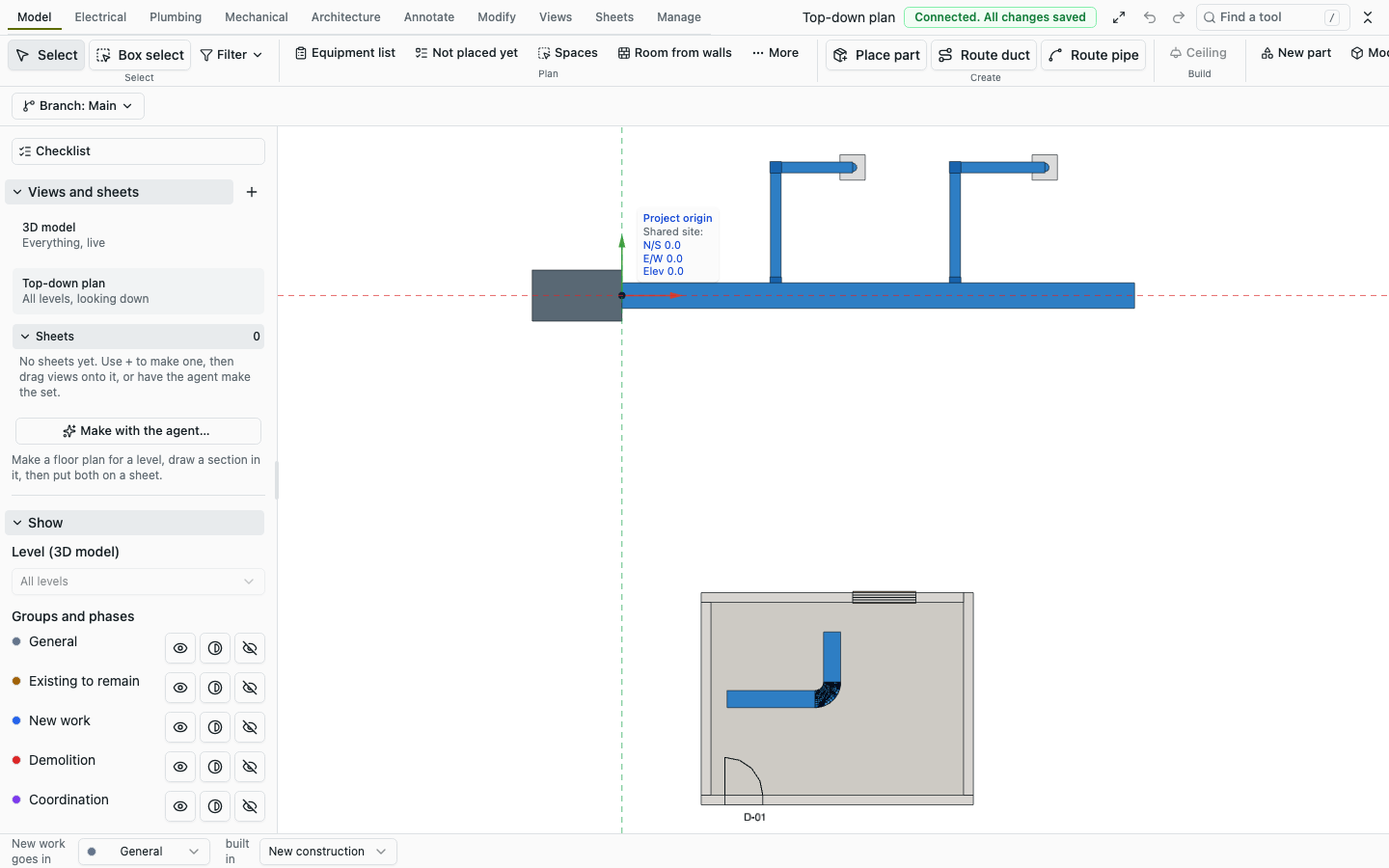
It worked on the first try, which I did not expect from a repository that went public three days earlier. Through npm run example, which runs a script the way an agent does against a fresh model, it made 7 edit steps and 13 records: 4 walls, 2 openings, 2 duct segments, an elbow, a slab, a space, a level and the supply-air system, applied in one approval in 2.0 s. The preview's quantities check out against the geometry: "+73 ft of walls" is the 22.12 m centreline perimeter, "+324 ft² of floors and slabs" is 6.24 by 4.82 m, "+297 ft² of spaces" is the 27.5859 m² net area, and "+13 ft" of duct is the 2.5 m and 1.6 m legs.
Defaults filled the rest. I gave the door no height and it got 2,134 mm, which is seven feet. I gave the window no sill and it sits at 900 mm. A scan pipeline should pass every measured dimension explicitly, or the model will carry American defaults where the cloud said otherwise.
The agent loop, measured
The MCP server is the part of Mutiny meant for agents, and its design is easy to state: the agent writes a script, the server previews it, a person approves, and only what was previewed lands. I ran it as mutinybim-mcp --http --model-server ws://127.0.0.1:3095/sync --model f-a-demo, so that whatever the agent landed appeared live in the browser editor, and wrote a small client with the official MCP TypeScript SDK that played the agent's part.
The tool list is small on purpose. The core server lists 10 tools: the nine the docs describe plus bim_enable_pack, which turns on a tool family on request. Its tool list serialises to 17,758 bytes of JSON. Started with --packs all, the same server lists 168 tools in 332,540 bytes. An agent that starts with the core and learns the scripting kit from bim_script_reference carries about a nineteenth of the tool schema in its context.
One run of my client against the live model:
| call | time | what came back |
|---|---|---|
bim_script_reference | 704 ms first, 5 ms after | workflow, the kit's functions, four examples |
bim_model_summary | 26 ms | revision 1, 13 elements, RTU-1 at 650 cfm |
bim_check_output | 48 ms | no findings, a script_id |
bim_run_script | 657 ms | previewed: 13 creates, the quantities, an output_hash |
bim_apply_output | 610 ms refused, 637 to 802 ms saved | asks for approval, then saved as revision 2 |
bim_query_elements, bim_validation_issues | 7 to 8 ms | all 26 records with their facts (my kind filter was ignored); 0 issues |
The approval goes through MCP elicitation: the server asks the client to show a person a form. The message my client received was "MutinyBIM wants to land "Scanned room S-01 with a 406.4x200 mm supply duct at 686 fpm" in model f-a-demo as one undo step: 13 new, 0 changed, 0 deleted", with a required boolean approve.
My first client answered with an accept and an empty form. The server answered not_approved, "Elicitation response content does not match requested schema", and the model stayed at revision 1. That was my bug, but it is a fair test of the gate: a client that does not say yes does not land anything. With approve: true it saved as revision 2, and the editor showed the room arrive with a "Local agent saved revision 3" toast on the second room I landed the same way.
bim_apply_output takes the preview's apply_with.args unchanged, including the output_hash and the base_revision. Landing re-runs the script and lands only output that hashes to what was previewed; the code answers stale_preview when the model moved in between. I did not trigger that path. Scripts run in a fresh Node process with the permission model on, an empty environment, 1 GB and 30 s caps; the docs say plainly that Node cannot deny a process the network, so this runner is for your own scripts on your own machine.
Two editors, one wall
Here is the claim to test. The architecture doc says: "No last-write-wins on intent. If two people set the same authored field differently, the later one gets a conflict and decides." The commit server re-runs each command on the current head and, for each field the command records as authored, refuses it if another session wrote that field since the command's base revision to a different value.
To race it I used the sync client the docs show for programs, SyncClient from packages/bim-sync, twice in one Node process: two sockets, two actors, each its own session. Each race connects both, waits for both to see the same head, then submits one command from each side in the same tick, so both requests carry the same baseRevision. The first to reach the sequencer commits; the second is decided against a head that has moved. The outcomes came back in 9 to 50 ms, but that is loopback inside one container and says nothing about network latency.
Five races behave as documented. Two people moving the same wall get "Priya changed wall-…-4 start while you were editing" for whoever arrives second. An agent, with an actor id of the form agent:<user>:<run>, gets the same refusal in the same words. Priya in two tabs is refused by Priya, because each tab is its own session. A delete of a wall someone just edited is refused with "check it before deleting". A move and a thickness change on the same wall both commit, because they are different fields.
The move with the same offset surprised me until I read why. Both sides sent move_wall with delta: { x: 50 }. The second is re-run on a head where the wall has already moved 50, so it writes the wall at 100, which differs from what Priya wrote, and the same-value exemption never applies. Intent commands that are deltas cannot match each other. That is defensible; an absolute "set start to (x, y)" would have committed.
The thickness race is the finding. Priya set a wall to 300 mm and Avery set it to 250 mm, on the same base. Both committed, as revisions 15 and 16. Afterwards the wall was 250 mm, its version had gone up twice, and its authoredRev had no entry for thickness. Neither of them was told anything.
The code says why. In packages/bim-kernel/src/elements/commands.ts, the element-core commands (set_element_class, set_element_type, set_element_values, set_element_placement and set_element_thickness) share one exit:
return finish(reader, working, touched, [], () => [], { summary: [summary] });The fourth argument is the list of authored writes, and it is empty. planCommit() only compares fields that are in that list, so for these five commands there is nothing to conflict on, and the policy degrades to last write wins. move_wall, by contrast, pushes start and end (and the ends of joined walls it drags along). The part-parameter command set_parameters records values.<name> and is protected. What I measured is thickness. set_element_values shares that exit line, so I expect the same result, but I did not race it; set_parameters I only read.
For a scan-to-BIM handover this matters more than it would for a drafter. The work an agent does after a scan is exactly element-core work: set a type, set a class, fill a parameter with set_element_values, correct a thickness the fit got wrong. Those are the edits where two agents, or an agent and a person, can overwrite each other without a word. The delete rule still protects the element as a whole, because it looks at which elements changed rather than which fields were authored, so the failure is a silent overwrite, not a lost wall.
It looks like an oversight in one switch statement rather than a design decision, and the fix is small: push { elementId, field } per written field before finish, the way move_wall does. It is the first thing I would send upstream. The roundup's commit simulator assumes the field being written is recorded. For thickness, the running code does not record it; I did not race height.
What the IFC 4.3 file contains
Export is a pure function: exportIfc() in packages/bim-ifc takes the model, a project and a timestamp and returns STEP text. It never reads a clock, it visits elements in id order, and every GlobalId is derived from a stable id, so "the same model and options give the same bytes". I called exportIfc() directly from a small script on the room model.
The room came out as 15,964 bytes in 34 ms: FILE_SCHEMA(('IFC4X3_ADD2')), view definition ReferenceView, 289 entity instances of 45 types, lengths in millimetres. The exporter's report counted 10 building elements (4 IfcWall, 1 IfcSlab, 1 IfcDoor, 1 IfcWindow, 2 IfcDuctSegment, 1 IfcDuctFitting), 2 IfcOpeningElement with their voids and fills, 1 IfcSpace with 4 IfcRelSpaceBoundary, 1 IfcDistributionSystem, 6 IfcDistributionPort, 12 property sets, 1 quantity set and 1 type (IfcWallType). It reported no warnings and nothing skipped.
IfcOpenShell 0.9.0 opened it and its validator, with EXPRESS rules on, reported nothing. I exported the repository's four example models the same way: the small office (41,017 bytes, 29 elements), rooftop unit (21,177 bytes, 12), plumbing riser (78,933 bytes, 48) and electrical room (30,806 bytes, 17). Three of those validated clean too. The electrical room has one error: a property written as IFCCOUNTMEASURE(30.), a real, where the IFC4X3_ADD2 schema as IfcOpenShell reads it types IfcCountMeasure as an integer. It is a one-character bug in the writer and most viewers will shrug at it; a strict checker will not.
The tree below is my file, generated from it rather than typed.
Valid is not the same as useful. Reading entity by entity against the kernel record each came from:
Walls are extruded boxes along their centreline, with nothing else. Thickness survives only as the profile's YDim. There is no IfcMaterialLayerSet (the file has zero materials), no Pset_WallCommon (so no IsExternal, LoadBearing or FireRating), no base quantities. The only property set on a wall is MutinyBIM_Organization: group, phase created, phase demolished and a Status of NEW. That Status is the right idea in the wrong place; IFC's common property sets have a standard Status property that tools look for.
Corners are not joined. The exporter writes each wall as a strip from its start to its end (geo.strip(Math.hypot(dx, dy), el.thickness, el.height)) and writes no IfcRelConnectsPathElements. On my closed loop of 230 mm walls, the south wall runs from x 0 to 6,240 mm and the west wall from y 0 to 4,820 mm, both centred on their lines. So at each outer corner a 115 by 115 mm square is empty, and at each inner corner the same square belongs to two walls. The editor's 3D view draws the corners closed, and move_wall drags joined ends along, so the kernel knows about joins. The IFC does not carry them. Over a 3 m height that is about 0.04 m³ of missing wall per corner, and a clash check against a scan will light up every corner.
The space has no geometry. IfcSpace 'S-01' has a reference, a long name, NetFloorArea 27.5859 m² in Qto_SpaceBaseQuantities, and four physical boundaries with no connection geometry. It has no body and no footprint. A viewer can list it but not draw it, and anything downstream that computes volumes or checks room heights from IFC has nothing to work with.
MEP is topology, not data. Each duct segment is an extruded 406.4 by 200 mm rectangle with two IfcDistributionPort records, assigned to the supply-air IfcDistributionSystem. The size is only in the profile; there is no property for it, no PredefinedType, and no flow. The elbow has PredefinedType BEND and its two ports, and no body at all.
Openings are done properly. The door and window each void their host wall through an IfcOpeningElement and fill it, with OverallWidth and OverallHeight (900 and 2,134 for the door). The spatial tree is the standard one: project, site, building, storey, with every element contained in the storey.
None of that is a reason to call the exporter bad. Version 0.1.0 of bim-ifc writes a geometrically honest, schema-valid file with stable ids, and the gaps are additive. It is a reason not to call the export a handover. For a reviewer in another tool, today's file is massing with openings, a space list and a duct graph.
The post's video, and the same kind of build through MCP
PermitZIP's 11 November post says an assistant "wrote a script that built the sheets, schedules, rooms, spaces, RTU, VAV boxes, electrical equipment, circuits and single line diagram, and then it ran the script". The 105 s video attached to it is a walkthrough of the finished model: mechanical and power plans, an electrical one-line, a switchboard schedule, then the building in 3D. It does not show the script being written or run.
I did not have that script. What I could reproduce is the same pattern at a smaller scale: the repository's own rooftop-unit and electrical-room examples, shifted to free space and landed on the live model through my MCP client, one approval each. The first sizes and places a 10-ton rooftop unit, routes supply and return ducts at 1,043 fpm, tags them and puts a mechanical plan and an equipment schedule on sheets. The second places a panelboard and 11 receptacles in two rooms, circuits them ("11 receptacles (meets NEC 210.52), 2 circuits on 1 unit. LP-1 1980 VA connected", in the script's own label) and puts a power plan and a panel schedule on sheets. They landed as revisions 24 and 25, each preview taking about 0.7 s and each apply about 0.8 s. There were no VAV boxes and no single-line diagram in my run, because the examples do not make them.
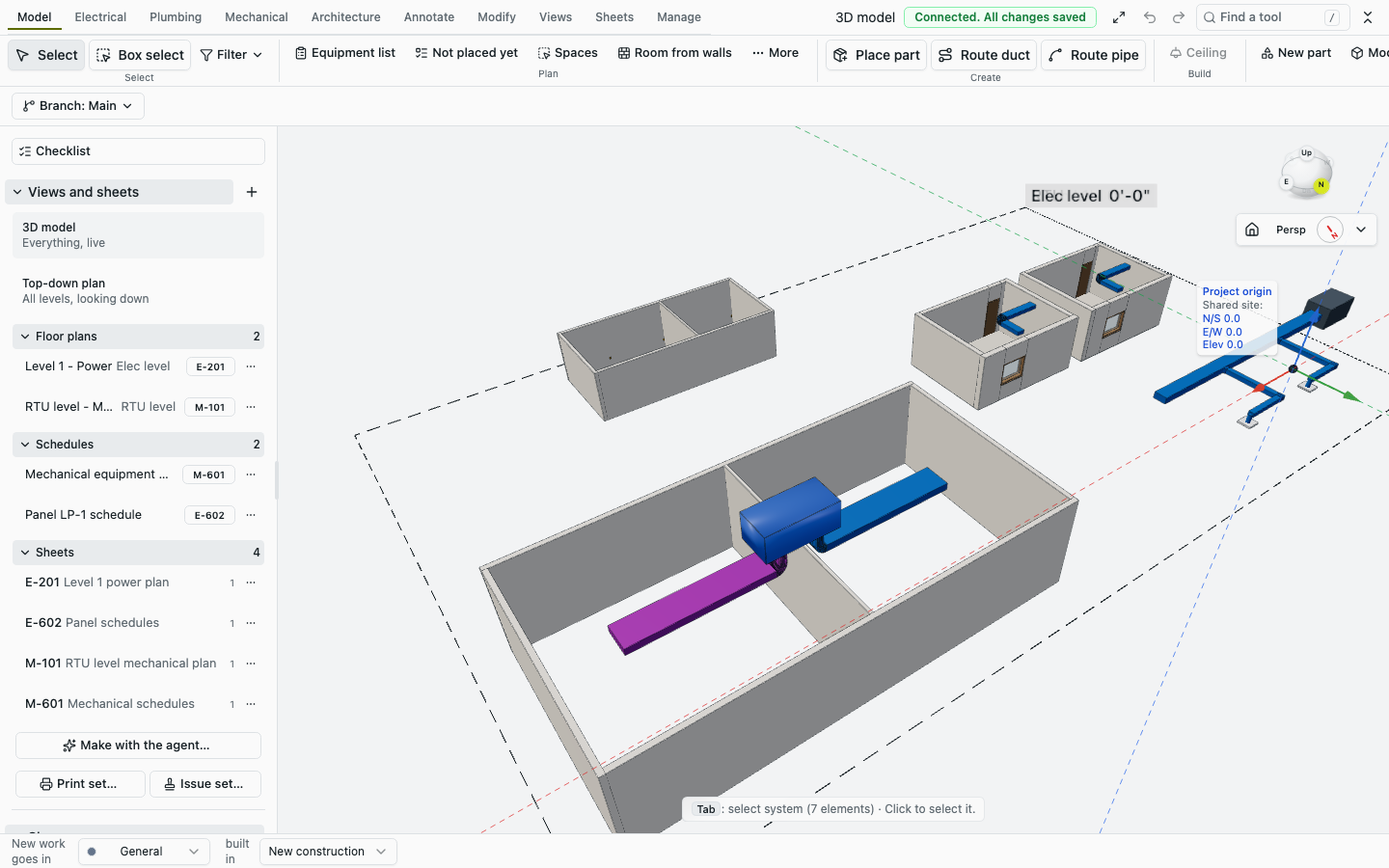
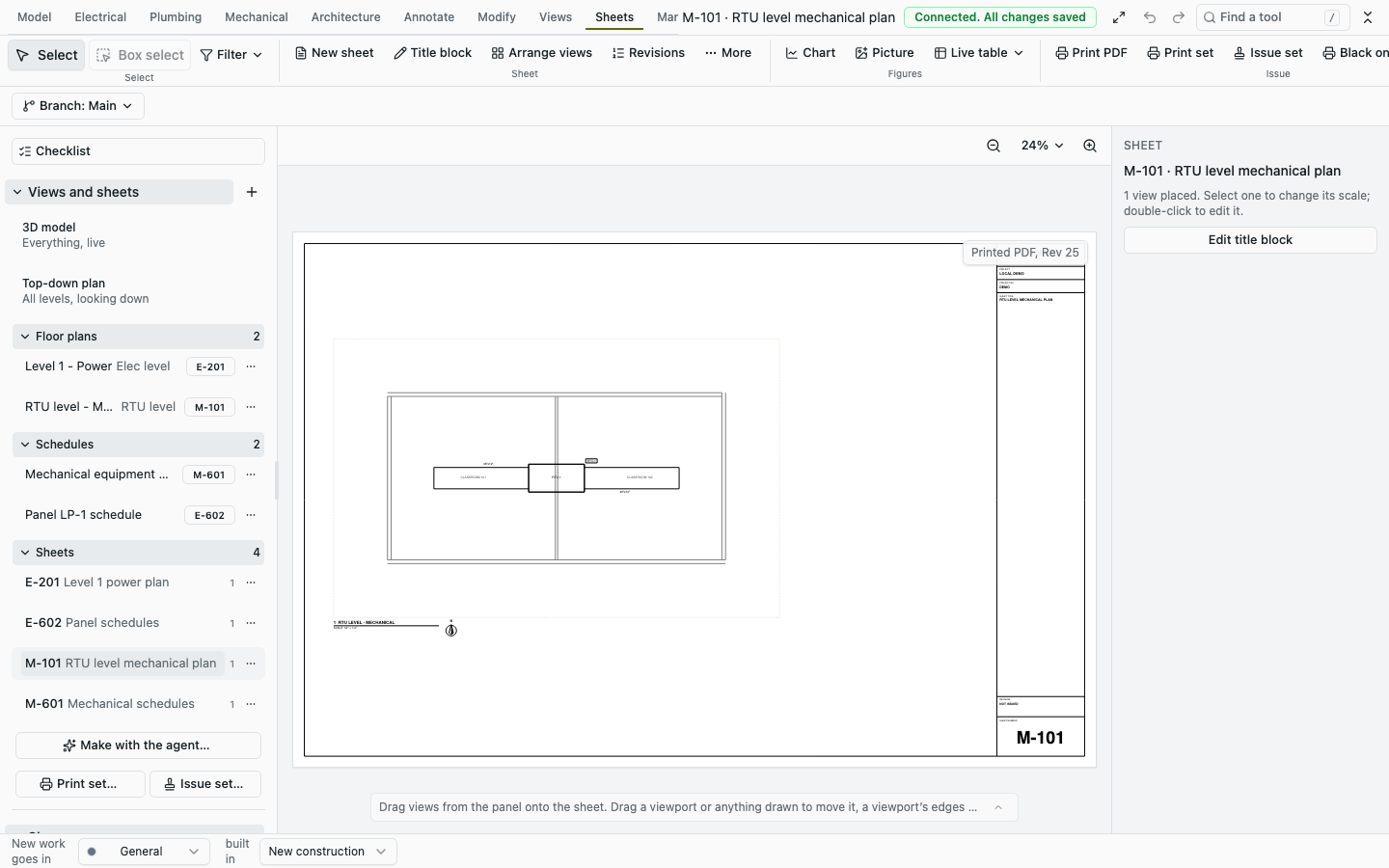
So the claim in the post holds in kind. An assistant that writes one script against this kit can produce plans, schedules and sheets with sized equipment, and the server lands it as one reviewable change. Whether that script came out of Grok in one go, I cannot check from a video.
Where it fits a scan-to-BIM pipeline
Put the five steps up again: capture, reconstruct, model, make it BIM, ship. Mutiny takes no point cloud, mesh or splat; its underlays are PDF, image, DXF and DWG, and it links IFC models through web-ifc. So it does not help with the hard step, turning a registered cloud into wall lines. That stays with a fitting stage, whether a learned layout model like SpatialLM, which writes a room's walls and openings as text from a point cloud, or a program that writes the building as data, like debim.
What it can be is the place that output lands. A fitting stage emits a script like mine, with every measured dimension passed explicitly. bim_check_output catches what the kit would refuse. bim_run_script previews it, and a person looks at the preview against the scan before saying yes. The elements land in an existing phase, locked as existing conditions, and design work proceeds against them in the same model. Spaces come from the walls. MEP routing and sizing run on top with refusals in words. Sheets and schedules are generated by scripts the same way. Several people and agents work at once, and the commit server stops the conflicting moves.
What stands in the way today, all of it visible in my run:
- Thickness is last-write-wins, and by the code so are element parameters. The edits an agent makes on a scan-derived model (types, classes, parameters, thicknesses) are the ones that record no authored field. Until those commands record authored fields, two agents filling parameters on the same walls will overwrite each other in silence.
- The IFC is not a handover. No materials, no common property sets, no joined corners, no space geometry. If the deliverable is an IFC for a consultant's Revit or a checker, something has to enrich it after export.
- Defaults are imperial. A door with no height is 2,134 mm and duct sizes come from an inch list. A scan pipeline must pass everything.
None of these is deep. The commit model, the approval loop and the add-on contract, which are the hard parts to get right, are right.
Where I land
I would use Mutiny BIM now as the shared model behind a scan-to-BIM agent, not as its deliverable. The script-preview-approve loop through MCP is the cleanest agent interface I have seen on a BIM kernel: one script, one preview with quantities, one approval, one undo, and a gate that refuses anything not explicitly approved. Refusals for conflicting geometry edits arrive by name, for people and agents alike. That part is worth building on.
I would not trust it yet with concurrent parameter work, and I would not hand its IFC to anyone as a model. The first is a one-line class of fix I expect upstream to take; the second is a version-0.1.0 exporter with a long, additive to-do list. If you are evaluating it for capture work, run my race with set_element_values on your own walls before you put two agents on one model.
How I checked. Ran: the install, the dev server and editor, npm run example on my script and the four repository examples, the export of all five models with my own call to exportIfc(), IfcOpenShell's validator on each file, my MCP client (four landings on the live model, one deliberately unapproved), the seven races with two SyncClient sessions, and three test paths. Read, not run: the set_element_values and set_parameters code paths, locking elements as existing conditions, the exporter's determinism, the add-on loading rules, the script runner's sandbox, the stale_preview path and the Postgres model server. The numbers in the 250k budgets are covered in the roundup; I did not run the performance gate on a shared machine.