Tools and papers, 24 November: GPU modules that borrow your frame, alpha learned inside an RGB latent, and what Tesla's Reality View is drawn from
mdjsonmcp2026-11-24 · 25 min · webgpu · kernels · image-generation · agents · slam · rust · generative-ui · world-models
A 3:01 narrated explainer, drawn in code. Every number and picture in it is this article's own; the sources are below.
› transcript
This street is not camera footage. Tesla's new Reality View draws it, live, from above the car. People guessed Gaussian splatting. By Musk's account, it is a separate generator reading the driving model's own features. I'm Matte. Nine posts on seven subjects went past this week. I read what each one pointed at, starting with a paper about transparency. AlphaAnything gives image generators a fourth channel, opacity. It keeps the pretrained decoder frozen, stage by stage, latent to colour. Beside it runs a small alpha branch. At every stage it reads the colour features. The arrows only point one way. Nothing from alpha goes back. So for any latent, the colour comes out exactly as the original decoder makes it. But the alpha loss flows back through the frozen decoder into the LoRA. The latent itself learns to carry opacity. From text it makes separate transparent layers, which the authors arranged by hand. From a finished image it pulls each object out as a cutout. On extraction its masks overlap the truth far better than the baselines. Its colour on the FLUX version is worse, though. TypeGPU Kit is fifty WebGPU modules. Each one records into the frame you own. Here each line of the frame function lands in one stage: camera, shadow, scene, bloom, finish. The shaders are TypeScript, marked use gpu. At build time a plugin parses each one and keeps its syntax tree beside it. When a pipeline is made, TypeGPU walks that tree and writes WGSL. Pine is an agent harness with a task board. Here one slash command turns a request into seven tasks. Five sub-agents take them. Agents do not talk to each other on it. If tasks are still open when the lead stops, the daemon calls it back. When everything is done, a sub-agent that did none of the work checks the answer. No model decides the job is finished. The board does. visloc-rs ports Basalt and COLMAP's mapper to Rust. Its README says it beats ORB-SLAM3 on 9 of 11 EuRoC sequences. It also lists where it still loses. That paragraph is the reason to trust the rest. On Vercel's UI SDK, ui-feed shows each component in a costume, with a prompt you can copy. We fork off from these UVE features, then run a separate, roughly one-billion-parameter diffusion model. And a hobbyist's version of a room, from four webcams. It smears where the cameras cannot see, and he has not said how it works. The idea I would keep: a new output can read a frozen decoder and leave its colour, for a given latent, exactly as it was. A one-way alpha branch, modules that borrow your frame, and a board that decides when the work is done. Every source is in the full article. I'm Matte. Bye!
Why read this
Solidtop 85%Nine reposts read to their sources: the Metal news is MLX, Pine's boards are not a chat, and Reality View's model is known only from Musk's reply.
- Original analysis
- Concrete numbers to act on
- Explained from first principles
Developer tools & infraRuns on a consumer GPUMixed licencesPractitioner roundup
How this was scored
- Is it new?
- 1 of 3: An incremental tweak
- Can I trust it?
- 2 of 3: Measures key facts from files, code or configs
- Can I run it?
- 1 of 3: API-only, gated or restrictive licence
- Will I understand it?
- 2 of 3: Mechanism from first principles with figures
- Can I act on it?
- 2 of 3: A concrete recipe, numbers or comparison
- Will it last?
- 1 of 3: Relevant for months
- Does it affect many?
- 1 of 3: A specialist community
- Only here?
- 2 of 3: A teardown or measurement few others did
Score 55 of 100, ranked 602 of 780 rated articles. Each question is answered 0–3 by hand, and a 3 is rare. How articles are scored
Nine of my reposts from 22 and 23 November, on seven subjects. Four are tools: a set of WebGPU modules, a kernel hub learning to speak MLX, an agent harness with a task board, and a Rust reconstruction stack. One is a paper on giving image generators an alpha channel. One is a directory of what people built on Vercel's UI SDK. And two posts about Tesla's new driving visualisation, one from a hobbyist who built something like it at home and one correcting what it is.
For each I read what the post pointed at: the docs and the package, the release notes and the diff against the release before, the paper in full, the repository at a pinned commit, or the original posts. Three of them say something a little different from the post that carried them.
TypeGPU Kit: modules that record into your frame
TypeGPU Kit is Software Mansion's set of building blocks for 3D scenes and effects on WebGPU, in the browser and in React Native. @typegpu/kit 0.1.0 went to npm on 23 November under MIT, and its root entry exports 50 modules: cameras, lighting, shadows, bloom, TAA, depth of field, particles, trails, instancing, a mesh pool, glTF, text, a GPU sorter, a spatial grid, readback, and a table for rows of data in a buffer.
It sits on TypeGPU, so the shaders are TypeScript. A function whose body starts with 'use gpu' is picked up at build time by unplugin-typegpu, which parses it with Babel and stores its syntax tree next to the function in a compact format called tinyest. At run time, when a pipeline is created, TypeGPU walks that tree and writes WGSL. Inside such a function a * b works on vectors, but it only type-checks under tsover, TypeGPU's fork of TypeScript, which the getting-started guide installs in place of typescript (typescript@npm:[email protected]). The kit's own packages ship with their 'use gpu' functions already transformed. The Shaders library is the biggest codebase built this way that this site has read.
What makes it a kit rather than an engine is a contract the docs state as seven rules. Your program owns the device, the loop, the encoder, the passes and the one submit per frame. A module is a factory, create(root, options), that borrows the root and whatever you hand it, records into the pass or encoder you pass it, and on destroy() frees only what it made. It allocates when created and compiles in initAsync, so a steady frame creates no GPU objects. Modules connect through TypeGPU's own accessors and pipe (every renderer reads cameras.current), never through a registry or string keys. Many of a thing are rows in a buffer, not objects. The docs' own example of the cost:
// One pipeline per ripple: each centre is part of a shader's code
const ringsAround = centres.map((centre) => (uv: d.v2f) => {
  'use gpu';
  return std.sin(std.length(uv - centre) * 40);
});

// One pipeline for every ripple: the centres are data
const centreOf = root.createReadonly(d.arrayOf(d.vec2f, 16), centres);
The part I would copy into any library is the card at the end of each module's page, generated from its source. It says what the module owns, whether it allocates after setup (a video feed makes a bind group per camera frame), how many storage buffers and uniforms it binds (WebGPU guarantees only 8 storage buffers per shader stage, so the counts tell you what fits in one pipeline), where it records and in what order, and whether it ever submits on its own. A recordingRoot() runs a scene with no GPU and counts what it creates, so "a steady frame allocates nothing" is a test you can write.
What it leaves out is deliberate: no scene graph, no ECS, no physics, no required asset format. Next to three.js that is a lot of missing furniture. Next to raw WebGPU it is everything between a triangle and a lit, anti-aliased scene, with the passes still yours. Two cautions from the docs: 0.1.0 says generated WGSL and the commands a frame records "can change in any release", and the React Native path needs react-native-webgpu and worklets in Bundle Mode, with patches for Expo 58. The package also ships a SKILL.md for coding agents and a Markdown twin of every docs page, which is how I read it.
GPU modules on TypeGPU for lit 3D scenes, post-processing, particles, text, glTF models and simulations, on the web and React Native
- license
- MIT
- branch
- main
- forks
- 4
- open issues
- 1
- source
- 7.8 MB
- commit date
- 2026-11-24
GitHub REST API, 2026-11-24 — branch, commit, commitDate, createdAt, description, forks, homepage, languages, license, openIssues, pushedAt, stars, topics
Hugging Face Kernels 0.19: the Metal news is MLX
The post says "Metal kernels are now the first class citizen in Hugging Face kernels." The v0.19.0 release (23 November) is more specific. Metal was there already: v0.18.0's tree has relu-metal-cpp, a PyTorch kernel with a .metal shader and an Objective-C++ loader, and this release fixes a command-buffer race in it. What is new is MLX. kernels and kernel-builder now accept "noarch (JIT)" kernels for Apple's MLX framework, declared like this:
[general]
name = "relu-mlx"
version = 1
edition = 6
license = "Apache-2.0"
backends = ["metal"]

[mlx-noarch]
The release's example under that heading contains no Metal at all. Its kernel is mx.maximum(x, 0), and its test loads it from the Hub with kernels.get_kernel("kernels-test/relu-mlx", version=1). The point of the example is packaging: an MLX function becomes a versioned artifact on the Hub that any Mac can pull.
The real Metal shader is in the builder's tests, nix-builder/tests/kernels/bfl-mlx: a dense BF16 attention kernel for head dimension 128, credited to Black Forest Labs, wrapped with mx.fast.metal_kernel so MLX compiles the Metal source at first use, with the sequence length, head count and scale passed in as template constants. Its docstring lays it out: a threadgroup is 4 simdgroups of 16 query rows, it steps through keys 32 at a time, every matrix multiply is a 16x32x16 matmul2d from MetalPerformancePrimitives (Metal 4), and softmax runs online in base 2. It refuses to run below GPU generation 17 (the M5) or macOS 26 and falls back to MLX's own attention there. The same shader source has a Torch variant beside it.
The rest of the release is plumbing that matters if you publish kernels: experimental CUDA kernels written in Rust (cuda-oxide and cutile-rs), a ZIP layout for kernels with many files that older kernels versions cannot load, kernels info --dep-tree for kernel-to-kernel dependencies, and parallel HIP compilation across GPU architectures. There are no benchmarks in it. If you write MLX code on a Mac, this is a way to ship a custom op to other people. If you wanted faster Metal kernels for PyTorch, nothing here changes that.
Build compute kernels and load them from the Hub.
- license
- Apache-2.0
- branch
- main
- forks
- 149
- open issues
- 42
- source
- 2.7 MB
- commit date
- 2026-11-23
GitHub REST API, 2026-11-24 — branch, commit, commitDate, createdAt, description, forks, homepage, languages, license, openIssues, pushedAt, stars
AlphaAnything: an alpha channel trained through a decoder it cannot change
An image generator makes three channels. A designer usually wants four: a glass bottle, a feather or a logo that can be laid over anything, with opacity in the fourth. The usual fix is to train a new autoencoder that encodes and decodes RGBA, as LayerDiffuse, AlphaVAE and Qwen-Image-Layered do. That costs a training stage, ties everything after it to the new latent space, and can change how RGB decodes. AlphaAnything (Wang, Xu, Li and others at ByteDance and Tsinghua) measures that last cost: on 295 source images, OmniAlpha's RGBA autoencoder has LPIPS against the originals of 0.05197, against 0.03807 for Qwen-Image-Edit's original RGB autoencoder.
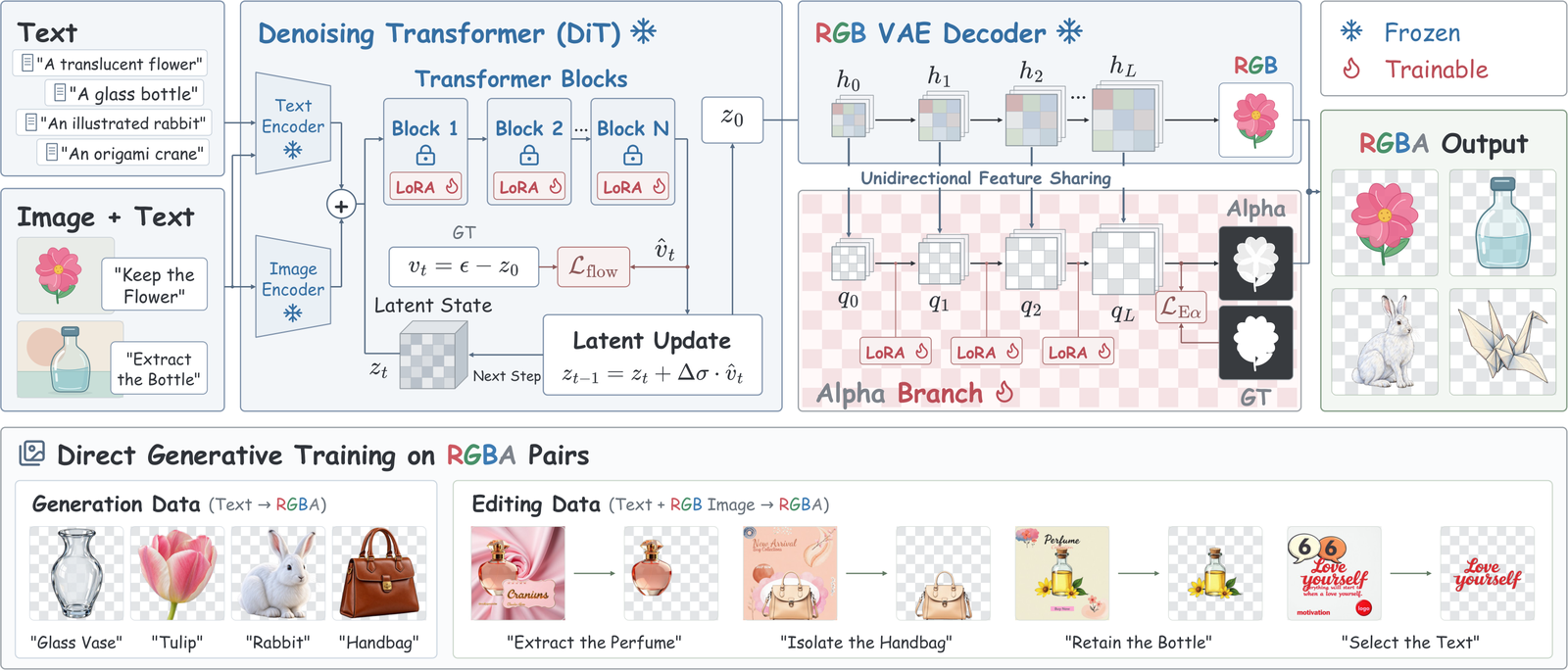
The method keeps the pretrained latent space and adds two trainable parts. LoRA modules (rank 64) go into the denoising transformer. An alpha branch runs beside the frozen VAE decoder: at each spatial stage it takes the decoder's RGB features through a narrow 1x1 projection and a 3x3 one, scaled by a learned gate, adds them to its own alpha state, and upsamples. Every arrow points from RGB to alpha. Nothing from the alpha state goes back, so for any latent the decoder's RGB output is exactly what the original decoder would produce (the paper's Proposition 1). Gradients, though, flow the other way: the alpha loss reaches back through the frozen decoder into the LoRA, so the latent the transformer generates is shaped to carry opacity as well as colour. Transparent pixels have no colour, so for the RGB target the authors borrow LayerDiffuse's trick of padding foreground colour outward into them.
The ablation shows why one-way matters. A decoder that also feeds alpha back into RGB, with every pretrained RGB weight still frozen, raises foreground RGB L1 from 0.0746 to 0.2435 on Qwen-Image-Edit.
The loss keeps pushing when a pixel is stuck
Alpha has two special values. Zero is exactly transparent, one is exactly opaque, and a model has to be able to hit both. AlphaAnything lets the alpha branch output an unbounded score , clips to , and maps that to opacity through , so any score past is an exact endpoint. The trouble with clipping is that a pixel predicted fully transparent when it should be opaque sits on a flat stretch, and an L1 loss on gives it no gradient at all.
So the target opacity is moved into the same coordinate, (the paper derives it as the Fisher-Rao arc length on the pair of compositing weights , which spreads out values near 0 and 1), and the loss is a Fenchel-Young form whose slope with respect to is everywhere, inside the band or out. Over the image, each pixel's loss is split by its target weights into a background part and a foreground part, and each part is averaged and square-rooted before the two are added. A square root of a mean shrinks more slowly than the mean when the bad pixels are few, so a thin strand or a small hole counts for more than it would in a plain average.
Here is one pixel of that, against L1. Pick the first preset: the target is opaque, the score has saturated at transparent, and only one of the two curves still slopes.
The alpha loss is applied to the one-step estimate of the clean latent during flow-matching training, down-weighted at high noise by . Everything was trained for 20K updates at batch 16 and learning rate , on 8,963 curated synthetic RGBA samples for text-to-RGBA and PrismLayersPro for extraction from an image. On FLUX.2 Klein Base 9B the trainable part is 111.149M LoRA parameters plus a 12.436M alpha branch. The extra cost at inference is the alpha branch in the decoder: on FLUX.2 Klein, VAE decoding goes from 0.148 s to 0.249 s inside a 41.212 s generation, which the paper puts at 0.244% (Table 17, 1024x1024, 50 steps).

What the tables show
On image-to-RGBA (Table 3, the authors' 735-example RGBA-Image set) the Qwen-Image-Edit version reaches a soft IoU of 0.9223 against 0.6932 for Qwen-Image-2.1 and 0.6881 for OmniAlpha, and a SAD of 30.3820 against 181.5245 and 178.4325. That is a large gap. The FLUX.2 version's RGB L1 is 0.1155, worse than both baselines (0.1052 and 0.0868), so the alpha is better there and the colour is not. On text-to-RGBA the AlphaAnything rows lead on ImageReward, 0.9752 for FLUX.2 against 0.7535 for the best baseline, OmniAlpha, on the 294-prompt RGBA-Text set, while on the outside AlphaTest set the best FID belongs to a baseline, Qwen-Image-2.1 at 72.2720 against 75.1796. Both of the main test sets were built for this paper, and the authors say plainly that good RGBA data and agreed metrics are scarce.
The weights are on Hugging Face as four adapters, each a transformer LoRA plus an alpha_decoder.safetensors: text-to-RGBA and image-to-RGBA for FLUX.2 Klein Base 9B (under the FLUX non-commercial licence, and loadable onto the 4-step distilled Klein 9B), and the same pair for Qwen-Image-2512 and Qwen-Image-Edit-2511 under Apache 2.0. The card warns that load_lora_weights in Diffusers loads only the RGB half; you need the authors' code for the alpha. I did not run them.
The idea outlives the checkpoints. Any latent model with a frozen decoder can grow an extra output this way, a depth map or a mask, without moving its RGB output for a given latent by a single value, because the new branch only reads. The LoRA does move the latent, which is how FLUX.2's colour can come out worse in Table 3.
AlphaAnything: Extending Pretrained RGB Generators to RGBA
- license
- Apache-2.0
- branch
- main
- forks
- 0
- open issues
- 0
- source
- 129.0 kB
- commit date
- 2026-11-24
GitHub REST API, 2026-11-24 — branch, commit, commitDate, createdAt, description, forks, homepage, license, openIssues, pushedAt, stars
- task
- text-to-image
- library
- alphaanything
- license
- other
- safetensors
- 8 shards
- largest file
- 444.6 MB
- files
- 20
- downloads
- 0
- likes
- 11
repo last modified 2026-11-24
Pine: a task board that is deliberately not a chat
Pine is "a reactive harness for agents": a daemon on macOS or Linux whose agents sleep until an event source wakes them. The site lists 21 sources, from mail, Slack and Telegram to MQTT, Modbus, syslog and ONVIF cameras. It is MIT, TypeScript, version 0.22.2 at the commit I read, and it is built on Earendil's pi-coding-agent SDK. The post announces two additions: "message boards for agent communication & task orchestration, and /swarm to orchestrate agents to reach a judged goal".
The boards' own docs (docs/references/boards.md) contradict the first half of that on purpose: "It is not a chat. Agents do not talk to each other on it: they take what is to be done and say what became of it." A board holds tasks and notes in Pine's database. An agent posts a task, claims one, and settles it as done with a result, failed with a reason, or blocked with a question that whoever handed out the work answers with board_answer. A task can wait on others with after, and its taker is shown their results. A claim belongs to a run, not to an agent's word, so when a run ends without settling its task, the daemon opens it again. The docs give the reason for the design in one sentence I agree with: "agents of equal standing that coordinate among themselves avoid the hard tasks and wait on each other, and sub-agents that are told to share what they find mostly repeat what they were told." A pool runs limits.maxSubagents sub-agents at a time (4 by default) through up to limits.maxPoolTasks tasks (100 by default).
/swarm makes one agent the lead of a job, and what makes it more than a prompt is in src/swarm.ts. Each time the lead ends a turn, the daemon looks at the board. Tasks still open: the lead is called again with their numbers. Everything done and an answer given: Pine posts a check of that answer and starts a sub-agent that did none of the work to run it. A failed check sends the lead back to fix it, and the fixed answer is checked once more, two checks in all. The source comment puts it as "No model is asked whether the job is done: the board says so." Only the owner can start, pause, resume or clear a swarm, and no tool reaches it, so an agent cannot give itself more rounds. The default cap is swarmRounds: 8.
The request in the video reads: "/swarm create a pixel art game with a pelican on a bike. clouds, birds, cats and people walking by: the world passes him by as he cycles. after every version a sub-agent that built none of it scores a screenshot from 1 to 10. don't stop before 8." The lead put seven tasks on the board: five build tasks, an integration pass and a critic. The post says the feature was primed on "countless" benchmarks. The repository's baseline/RESULTS.md is something else, 59 checks of the underlying pi SDK against a scripted mock model, and I found no published swarm results. What I can say from the code is that the stopping rule lives in the daemon, where the model cannot talk its way past it, and that is the right place for it.
a reactive harness for agents
- license
- MIT
- branch
- next
- forks
- 24
- open issues
- 7
- source
- 7.6 MB
- commit date
- 2026-11-24
GitHub REST API, 2026-11-24 — branch, createdAt, description, forks, homepage, license, openIssues, pushedAt, stars
visloc-rs: the camera half of mapping, in Rust
visloc-rs does structure from motion, dense multi-view stereo, visual-inertial SLAM, 3D Gaussian splatting and localisation against a saved map, in Rust, with GPU work through wgpu. The post celebrated 200 stars; on 24 November it had 246. It is dual-licensed MIT or Apache 2.0 and reads and writes COLMAP's model format.
Two of its pieces are ports, and saying so is what makes its numbers checkable. The SLAM is a Rust port of Basalt at commit 0f3b2b52, a tightly coupled stereo-inertial estimator with a keyframe and loop-closure mapper; the README says it matches native Basalt's trajectory error to within 0.1% on all 11 EuRoC sequences. The SfM mapper is a port of COLMAP's incremental mapper. "Everything is Rust" holds for the default build, but there is an optional native side: native/ has CUDA code for DPVO, splat training, MVS and descriptor matching, loaded at run time, and some results use it.
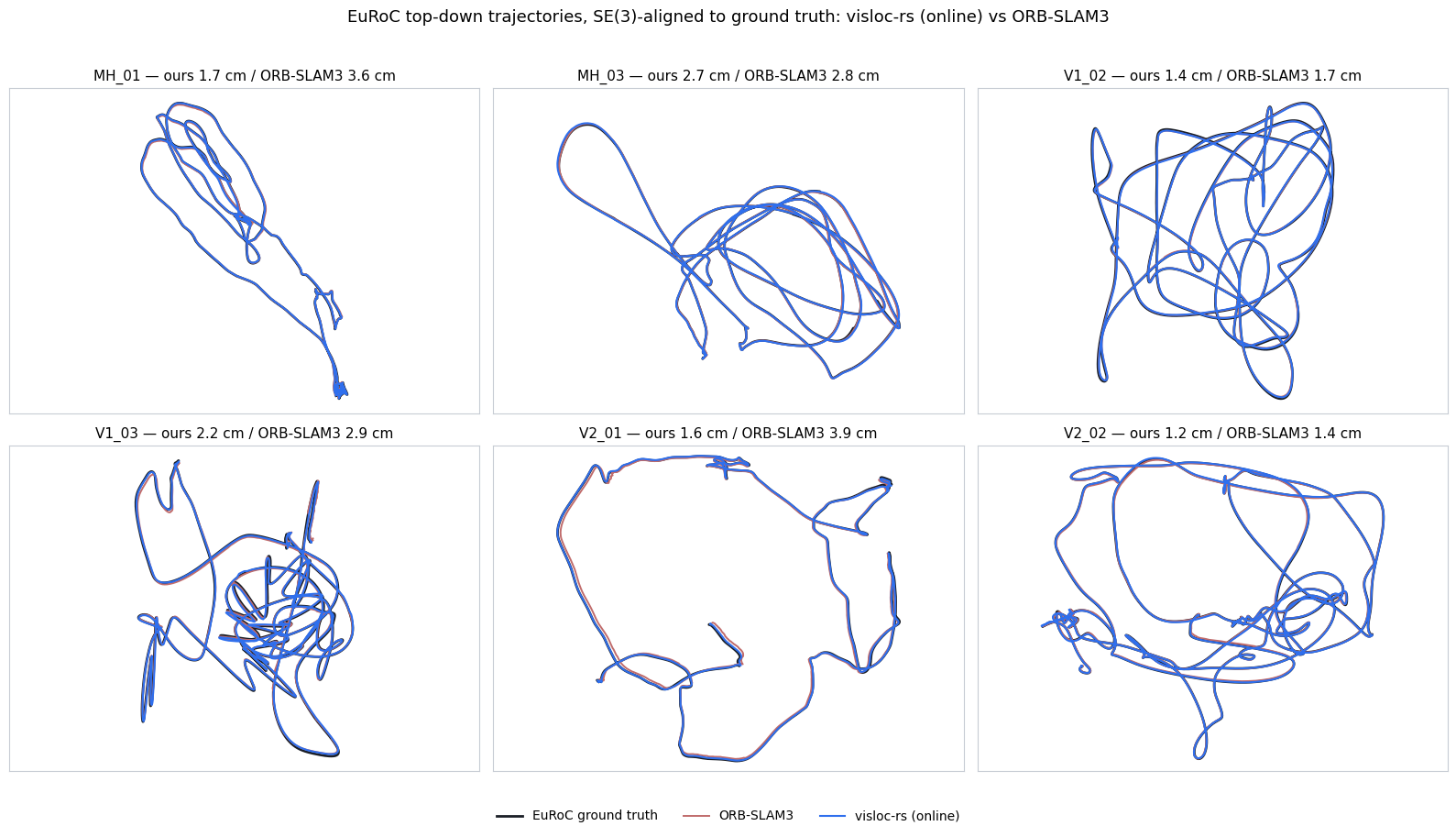
The README's headline numbers, all its own: the online SLAM beats ORB-SLAM3 on 9 of 11 EuRoC sequences and runs in real time on all 11 "on the dev machine", at 1.06 to 1.68 times real time, a machine it does not name. On LaMAria's Project Aria test set its mean score is 57.8, sixth, with five methods ahead at 66.7 to 75.9. On the 13 ETH3D DSLR scenes, fed the same COLMAP SIFT features and matches, its mapper scores 50.9, 75.5 and 82.1 AUC at 1, 3 and 5 degrees against 50.4, 75.2 and 81.7 for COLMAP 4.2's incremental mapper, in 28.4 s against 200.7 s. Splat training from photos is faster than brush 0.3 on 5 of 5 scenes, with PSNR within 0.05 dB on 4. What I like most is a paragraph headed "Where it still loses", which names COLMAP CUDA winning 3 of 8 EuRoC sequences, ORB-SLAM3 winning MH_04 and MH_05, and RMSE parity on a 10K-image rig set still open, each linked to the commands that reproduce it. I did not build or run it.
It is a camera-and-IMU stack, and the README says "LiDAR is not supported." So it is the other half of the LiDAR odometry shootout and Voxel-SLAM, not a competitor to them. The closest thing on this site is Accord, which builds metric maps from one camera and an IMU on top of OpenVINS; visloc-rs's LaMAria comparison has OpenVINS at 49.9 on one training walk against its 50.0.
SfM, MVS, visual-inertial SLAM, 3D Gaussian Splatting and map-based localization in Rust
- license
- custom
- branch
- main
- forks
- 23
- open issues
- 1
- source
- 25.0 MB
- commit date
- 2026-11-24
GitHub REST API, 2026-11-24 — branch, commit, commitDate, createdAt, description, forks, homepage, languages, license, openIssues, pushedAt, stars, topics
Awesome UI SDK and ui-feed: what people built on UI SDK in its first fortnight
Vercel's UI SDK is a headless behaviour library in five frameworks plus an agent bridge, which this site took apart when it launched. Awesome UI SDK is a directory of what people have made with it since, put together by Lio Rael and released under CC0. At the commit I read it lists 58 entries: 7 official resources, 21 component libraries, 3 framework adapters (Ember, Angular and Octane, all unofficial), 1 tool and 26 examples. Its selection rules are stricter than most awesome lists: an entry needs source imports, a dependency or documentation showing the integration, "a copied skill file or migration plan alone does not establish adoption", and entries say how far the integration goes (Frost UI: "The integration scope is unverified"). Two entries, Lenso UI and a mechanical keyboard, are the list author's own.
ui-feed is Chris Tate's weekend project, quoted by shadcn with "If you get the foundation right, your agents get to have fun. UI SDK handles the hard part." It is a vertical feed of 89 live components, scrolled like a phone app with j and k: a Newton's cradle that is a switch, a prism that is a colour picker, a hand pump that is a number input. Each card names the UI SDK component underneath and has a "Copy prompt" button. Its source is not published, so I cannot say how much of each card an agent wrote.
The "Copy prompt" button is the telling detail. The feed treats each demo as a spec a coding agent can reproduce, which is how UI SDK was pitched: behaviour that is hard to get right lives in the library, and the costume is cheap. The directory is the evidence that people took it up.
A curated list of component libraries, tools, and examples for Vercel UI SDK.
- license
- CC0-1.0
- branch
- main
- forks
- 3
- open issues
- 0
- source
- 82.6 kB
- commit date
- 2026-11-24
GitHub REST API, 2026-11-24 — branch, commit, commitDate, createdAt, description, forks, homepage, languages, license, openIssues, pushedAt, stars, topics
Tesla's Reality View, and one built from four webcams
FSD v15 started rolling out on 21 November with a new in-car picture. The release note, as posted by @TeslaSI: "New real-time generative driving visualization that continuously streams a view from an arbitrary virtual camera situated above your vehicle, enabling you to see and control what FSD is planning to do."
It looks like a camera floating above the car, which is why people guessed at Gaussian splatting. A Korean poster, @yongZa_R, first asked exactly that: splatting builds a scene from several views and renders it from new ones, but how do you show places no camera saw? Hours later came a correction, which reads in my translation: "I stand corrected. It is not Gaussian splatting at all. FSD already drove by passing the image features UVE made, as tensors, to a 3B driving model. Reality View takes those same UVE features on a separate branch, puts them into a 1B diffusion model and draws that on the screen." The source for every one of those details is a reply from Elon Musk earlier that day, which reads in part:
The (much) smaller version of that in the car is a conditional mean-flow model, based on the recent sequence of Tesla Universal Vision Encoder features, which are the same ones that are plugged into the 3B encoder model that produces the driving actions.
We fork off from these UVE features, then run a separate ~1B diffusion model. This takes in the previous reality-view generation with added noise and then denoises it to the current visualization.
It then produces a small video chunk (8 images at 36 fps, at the resolution of the UI screen). This work is done by 1/2 of a TRIP engine every UVE frame at 18 hz and is spread over 4 cycles.
So, on that account: one vision encoder feeds both the driving model and a separate generator, and the generator is conditioned on the encoder's features and on its own previous frame, re-noised. He describes no 3D reconstruction and no splatting. The release notes say none of this; the names UVE, 1B and 3B appear only in Musk's reply, which calls the model a conditional mean-flow model in one sentence and a diffusion model in the next. In a second reply he says the visualiser gets half of one of three TRIP accelerators on one chip and that TRIP "basically only handles 8-bit int and has to run softmax in emulation mode in 28 steps", and in the first that latency is "a bit high due to compute constraints".
The timing can be checked against itself. If "spread over 4 cycles" means four encoder frames per chunk, a chunk takes 4/18 of a second to make and covers 8/36 of a second of screen, about 0.22 s both ways by my arithmetic: the generator just keeps pace, and what it shows is at least one chunk old. That fits the latency he admits.
What that means for the picture is my inference, not his: it is drawn from what the driving model's encoder carries, so it is a fair window into what the car has taken in, but it is drawn by a different network. A car that appears on screen and is not there, or the reverse, is a generator's mistake and says little about what the planner did.
The other post is the hobbyist's. Dean (@DeanTheBuilder_) wrote that "FSD v15 just nuked my project": two months on a "Live Reality Model" of a room from "Four $50 Logitech C920s below (720p, ~20 fps)", which he can free-roam in real time. In the thread he says that where several cameras cannot see him the model "tries to predict my limbs but fails hard", and a later post adds that it runs on "one GPU".
He has not said how it works: splats, depth fusion, a generative model or a mix. From the video, it renders the room from viewpoints none of the four cameras has, in real time, and it smears where coverage is thin. Without a method there is nothing more to check.
Where each number comes from
Read on 24 November: TypeGPU Kit's docs as Markdown (index, getting-started, concepts/how-the-kit-works, the module list) and its npm metadata, plus typegpu and unplugin-typegpu on npm; Hugging Face Kernels' v0.19.0 release notes, the v0.18.0 and v0.19.0 trees, the relu-mlx example and the bfl-mlx test kernel; AlphaAnything's paper through arXiv HTML (2610.32413v1), its Hugging Face card and repository metadata; Pine at commit 74ef328 (boards.md, src/swarm.ts, src/config.ts, baseline/RESULTS.md, package.json) and frames of the posted video; visloc-rs's README at commit eee6be5; Awesome UI SDK at commit aaa07d2 and ui-feed's page; and the posts by @TeslaSI, Elon Musk, @yongZa_R and @DeanTheBuilder_ through the fxtwitter mirror. Every benchmark, speed and count on this page is its source's. My own arithmetic is the Awesome UI SDK section counts, the Reality View chunk timing, and the widget, which evaluates the paper's Eq. 8 and plain L1 on one pixel. I translated the Korean post myself. I ran none of the software.