Open 3D Skills: building an exploded view by the instructions, and what the 60 fps recorder actually does
mdjsonmcp2026-11-09 · 17 min · agents · agentic-coding · 3d · threejs · developer-tools · generative-ui

Why read this
Notabletop 60%Follows the exploded-view and frame-capture skills to build and record a gearbox, measures the recording, and finds where the virtual clock leaks.
- Interactive explanations
- Original analysis
- Runs on a laptop CPU
Developer tools & infraMITPractitioner tool
How this was scored
- Is it new?
- 1 of 3: An incremental tweak
- Can I trust it?
- 2 of 3: Measures key facts from files, code or configs
- Can I run it?
- 2 of 3: Open code or weights with real limits
- Will I understand it?
- 3 of 3: Mechanism carried by interactives built from real code or data
- Can I act on it?
- 2 of 3: A concrete recipe, numbers or comparison
- Will it last?
- 2 of 3: A reference for a year or more
- Does it affect many?
- 1 of 3: A specialist community
- Only here?
- 2 of 3: A teardown or measurement few others did
Score 67 of 100, ranked 225 of 701 rated articles. Each question is answered 0–3 by hand, and a 3 is rare. How articles are scored
A post from @CY160909 on 1 November said, in Chinese, that a set of 3D skills had been open-sourced the day before and that playing with it was addictive: eight skills for Claude Code, Codex, Cursor and the rest, which make three.js scenes, scroll animations and mechanical exploded views, with browser checks and 60 fps recording. When I fetched it, the post had 394 likes and 54 reposts, and a 2236x1398 video of the result.
That is a list of claims I can check from the repository, because none of them is about a model. A skill is instructions plus scripts. Either the instructions are good enough to follow, or they are not. Either the recorder records at 60 fps, or it does not. So I did what the skill asks an agent to do. I read all eight SKILL.md files and every script. Then I followed the exploded-view skill to build a small planetary gearbox from code, checked it the way site-check describes, and recorded it with the technique frame-capture describes. I measured the frame rate and the file.
One thing changed the plan, and I will say it up front. The sandbox I work in refused to execute the repository's code. It refused the skill's serve.py, and it refused loading the skill's explode.js into Chromium. So I re-implemented the three pieces I needed from the skills' own descriptions: the staging rule, a browser probe and a virtual-clock recorder. They are each a few dozen lines. Everything measured below ran on those re-implementations, on this sandbox's CPU, in Playwright's Chromium 141 with no GPU. Where I say the repository does something, I read it in the code. Where I say it works, I ran my copy of it.
- license
- MIT
- branch
- main
- tests
- 1 file
- source
- 174.9 kB
- commit date
- 2026-11-09
by size of tracked source at this commit, file counts in brackets; docs, data and vendored trees excluded
Read at 53beb89 (9 November 2026), a depth-1 clone. Release 1.0.0 dated 31 October 2026. MIT, copyright exploraX. 64 tracked files: 8 skills, 8 SKILL.md files, 3,432 lines of scripts and browser modules.
local clone, 2026-11-10 at 53beb89 — branch, commit, commitDate, fileCount, hasTests, languages, license, licenseFile, shallow, testFileCount
shallow clone: counts describe the pinned tree, not the history
What is in the box
The repository is by exploraX (@exploraX_ on X, Moh4696 on GitHub). The changelog dates release 1.0.0 to 31 October 2026, which matches "the day before" in the post. The README says it plainly: "Every technique here was used to build a real site first, and every script was run on real footage before it went in."
There are eight skill folders under skills/, each a SKILL.md with YAML frontmatter, and most with a scripts/ folder of Python and an assets/ folder of browser ES modules. Around them sit five install surfaces: a Claude Code plugin marketplace (.claude-plugin/marketplace.json), a Codex plugin, a Cursor plugin, a Gemini CLI extension, and a shell installer that symlinks the folders into each agent's skills directory. The intended path is npx skills add Moh4696/open-3d-skills.
I counted the skills from the clone (measured):
Two things stand out in those numbers. First, the four skills that need nothing but a browser, Python and ffmpeg are the ones this article is about: threejs-scene, exploded-view, site-check and frame-capture. The other four turn AI-generated clips into page motion, so they need a paid image or video model to make their input, and I did not run them. Second, the descriptions are long: 525 to 739 characters each. The description is the only part of a skill an agent reads before deciding to load it, so it is written as a trigger list ("Use for 'show how it works', teardown or cutaway pages, product anatomy, engine, motor, gearbox…").
The repository tests itself. tests/check.mjs parses every frontmatter block with a strict YAML parser, because, as its header says, the agents "silently skip a skill whose frontmatter fails (an unquoted 'word: word' in a description is enough)". It also requires the skill's name to match its folder, caps the description at 1,024 characters, fails any file containing an em dash, runs node --check on the JavaScript and compiles the Python. And it checks that every scripts/, assets/ or references/ path a SKILL.md mentions exists. I could not run that test, but I re-ran the last check with my own regex over the clone: 19 file references, 19 resolve (measured).
The exploded view, by the instructions
exploded-view/SKILL.md is 927 words. Its tools are assets/explode.js (192 lines: Exploder, Labels, Xray, Section, Picker) and a demo page that builds an induction motor entirely from lathes and instanced boxes, then takes it apart. This is the repository's own picture of it:
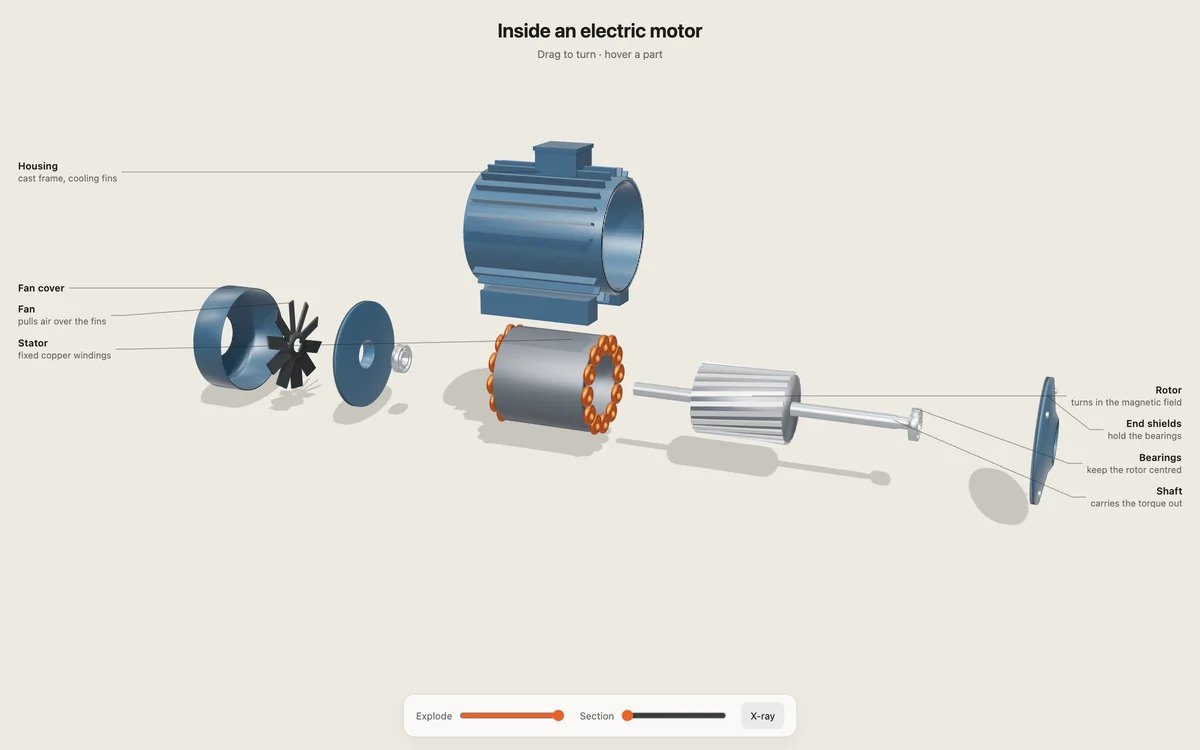
The skill reads as a procedure, and I followed it in order.
1. Structure the model as parts. "The unit of an exploded view is a part: a Group that moves as one." Every part is a direct child of one assembly group and gets its own materials, because x-ray and hover change materials and shared ones "would change every part at once." My gearbox has seven parts: a housing that carries the ring gear's teeth on its inside, a cover, a carrier with three pins and an output shaft, three planets, and a sun gear on an input shaft. The tooth counts are 12 on the sun, 18 on each planet and 48 on the ring, because a planetary set only meshes when the ring has the sun's teeth plus two planets' worth. Each gear is a cylinder plus one InstancedMesh of box teeth, which is the skill's "detail by kind, not by instance."
2. Decide how each part moves. Each part's userData carries stage, an optional explode: [x, y, z] offset at full explosion, and shell: true for casings. The skill's advice is to take things apart the way a mechanic would: covers and shells first, then the inner parts, along one main axis, with large shells moved up so the core stays visible. So the housing lifts 0.36 m on stage 0 and the cover slides off the end; the carrier pulls out on stage 1; the planets move outward on stage 2 with no offset given, so they take the default; and the sun and its shaft slide out the back on stage 3.
The stage rule is the most interesting piece of code in the skill, and it is short. With n distinct stages, Exploder.set(t) gives each stage a window of width 2 / (n + 1). Stage i starts at i times half a window, so each stage begins when the one before it is half done. Inside its window, a part's progress is a smoothstep of where t sits, and its position is home plus offset times that progress. The arithmetic makes the last window end at exactly t = 1 for any number of stages (read in explode.js; this widget re-runs it on the motor's real offsets from motor.js and on mine):
A part without an explode offset moves away from the assembly's centre by 1.2 times its distance from it, or along an axis if you give one. My re-implementation of the rule is 20 lines and keeps exactly that behaviour; the planets leave radially.
3 to 5. Labels, x-ray, section, picking. I kept x-ray (shells to 14% opacity with depth writes off, the skill's numbers) and skipped the rest, because they are interaction and I was recording. The labels deserve a word, though. Labels.update() projects each anchor to the screen, splits the labels into two columns by which half of the screen the anchor is in, keeps each column in the anchors' vertical order, pushes overlapping labels apart, and draws a leader line with one bend. The skill's rule is that labels "never cover the model", and the column layout is how: the model is in the middle and the text never is. On a phone it says to hide them and show one caption instead.
The page spins the sun while assembled, and turns the carrier and the planets at the speeds the tooth counts dictate. With the ring fixed, the carrier turns at the sun's speed divided by 1 + 48/12, so one fifth of it, and each planet spins backwards relative to the carrier at 48/18 of the carrier's speed. That is gear arithmetic, not the skill, but it is the kind of accuracy the skill asks for in its last section: "An explainer that is wrong teaches the wrong thing confidently."
Four frames from my recording, assembled, exploded, x-rayed and reassembling:
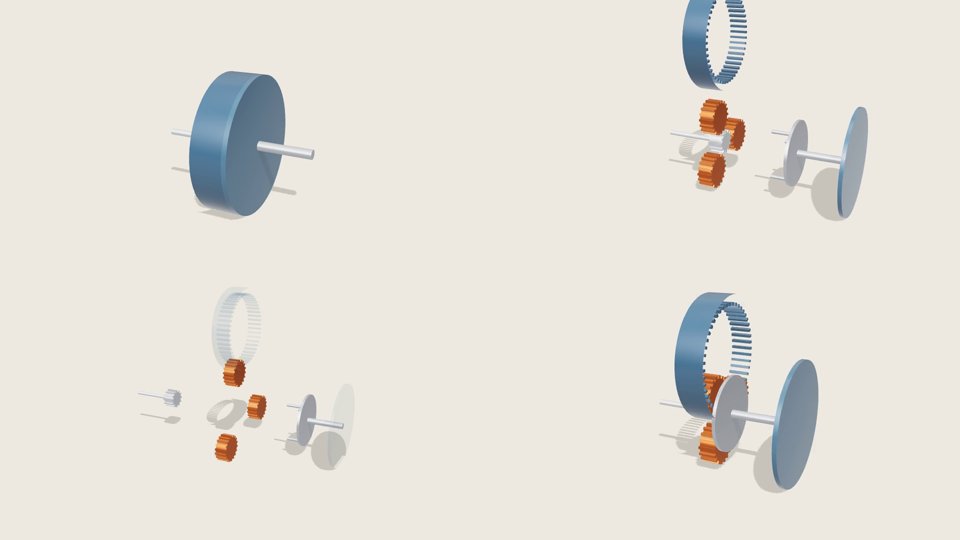
The scene renders 70 draw calls and 12,260 triangles per frame with the box at 60% exploded, with one shadow-casting light and a RoomEnvironment reflection map, the skill's recommended "product-shot lighting" (measured, from renderer.info). The threejs-scene skill's budget for a laptop GPU is under 300 draw calls and under 2 million triangles, and it says draw calls, "not triangles, are usually the limit" (the same point the GPU-driven pipeline in three.js meshlets attacks from the other side).
Checking it
site-check drives headless Chromium and WebKit at 1440, 768 and 390 px, and for each shot records page errors, failed requests, milliseconds per frame over 60 real frames, draw calls and triangles from window.__app.renderer, whether any visible canvas came out one flat colour, and horizontal overflow. It writes a contact sheet and exits 1 on any error, blank canvas or overflow (read in check.py, 205 lines).
My probe does the Chromium half of that for one width. At 1440x900 the gearbox set its ready flag after 2.6 to 2.7 s, logged no errors, and took 122 and 146 ms per frame in two runs, 7 to 8 fps (measured). The probe also reads the WebGL renderer string, and it said SwiftShader: Chromium's software rasteriser, because this box has no GPU. The skill has this case covered and says the honest thing: "If the report says the renderer is SwiftShader or llvmpipe, the GPU was not used and frame times mean nothing." check.py prints a warning when it sees either name. So 122 or 146 ms is a fact about this sandbox, not about the scene. What it does show is the problem frame-capture exists to solve.
Recording it at 60 fps when the page cannot draw 60
A screen recorder captures what the GPU managed to draw. If the page draws 12 frames a second, a 60 fps screen recording holds 12 pictures a second and shows each one about five times. frame-capture/SKILL.md puts it this way: "A frame can take two seconds to render and the video still plays at a perfect 60 fps."
The mechanism is in record.py (283 lines). Before any of the page's scripts run, an init script replaces the page's sense of time. performance.now and Date.now return a virtual time. requestAnimationFrame stops scheduling anything and just queues the callback. CSS animations are paused and their currentTime set from the virtual clock every frame, and every <video> is held paused and seeked to it. Then the recorder loop does three things per output frame: advance the virtual clock by exactly 1000 / fps milliseconds, run every queued animation-frame callback once, and take a screenshot, which is piped as PNG into ffmpeg. Nothing on the page can tell that each "16.7 ms" took a tenth of a second.
The page can also choreograph itself. If it defines window.__recordFrame(t), the recorder calls it with the virtual time in seconds before every frame. My gearbox uses that behind ?record=1: explode over 2.4 s, x-ray for most of a second, reassemble.
My recorder implements that technique for performance.now, Date.now and requestAnimationFrame (the page has no CSS animation or video). I ran it for 6 s at 60 fps at 960x540, with the same H.264 settings the skill uses (CRF 16, yuv420p, +faststart, no audio). Before it, I let the same page run on the real clock for 5 s and counted its frames. Everything in this table is measured:
| value | |
|---|---|
| Real-time frames in 5 s at 960x540 | 56 (11.2 fps); 61 in an earlier run |
| Output frames | 360 |
Container frame rate (ffprobe avg_frame_rate) | 60/1 |
| Spacing between frame timestamps | 16.666 to 16.667 ms |
| Distinct captured screenshots (MD5 of each PNG) | 312 of 360 |
| Screenshots identical to the one before | 48 |
| File size | 482,270 bytes (471 KB), 636 kbit/s |
| Wall time to record | 39.7 s, 110 ms per frame |
| Of which, the screenshot | 105 ms per frame, on average |
So the claim holds. The page could not draw more than 12 frames a second, and the file has 360 frames on an exact 60 fps grid. The 48 repeated screenshots are not dropped frames: they are the 0.8 s from 2.7 s to 3.5 s when the box sits fully exploded and the gears stop turning, and 0.8 s at 60 fps is 48 frames. Every frame in which something moved is its own picture. The cost moved from smoothness to wall time: a 6 s clip took 40 s, and the screenshot, not the rendering, was 95% of it. The skill's advice to make "a fast timing pass first" at 8 fps is the right response to that.
Where the virtual clock leaks
The skill is upfront about one leak, in bold: "Time comes from performance.now() or the rAF timestamp, never from setTimeout or setInterval." Timers keep real time, so a page that sequences itself with setTimeout(next, 3000) fires "after three real seconds, which might be frame 20 or frame 400." I measured that with a small page that changes colour from a one-second setTimeout, and makes a second change when its rAF timestamp passes one second. Captured 240 frames under my virtual clock (measured):
- At 320x180, about 24 ms per captured frame: the rAF change landed at frame 61, the one-second mark. The
setTimeoutchange landed at frame 30. - At 1920x1080, about 53 ms per captured frame: the rAF change landed at frame 61 again. The
setTimeoutlanded at frame 18.
The timer fires at a frame set by how fast the capture runs, which is what the skill says. Its fix, a later(secs, fn) helper that queues work on the page clock, is in the threejs-scene starter.
There is a second leak the skill does not mention. record.py replaces Date.now, but not the Date constructor, so new Date() with no argument still reads the wall clock (read in record.py). I checked what that does in Chromium with the same override: after 600 steps of 1/60 s, Date.now() had advanced 10,000 ms and new Date().getTime() had advanced 201 ms, the real time the loop took (measured). A page that draws a clock or a countdown from new Date() will run at capture speed in the video. The workaround is the same as for timers: read time from performance.now().
Next to this site's own animation skills
This site already ships three vendored skills for drawn and built pictures, and they make a useful comparison, because each one solves the recording problem differently.
- hand-drawn-canvas-animation (in
brand-crew/skills/) renders films where the page exposeswindow.__drawFrame(i)and the renderer reads frames straight off the canvas withtoDataURL. The page is written to be recorded: frameiis a pure function ofi. - explainer-films, the engine behind this site's thumbnails, does the same with
FILM.frame(t). Scenario's kinetic-film skill works the same way: an engine that draws every frame as a pure function of time. - frame-capture records a page that was not written to be recorded. It takes the clock away from the page instead of asking the page to give up control. That is more general: it works on a three.js scene, a GSAP timeline or a scroll-driven site. The price is the leaks above, plus a screenshot per frame where the cooperative engines read a canvas.
The third vendored skill, isometric-figures, is Ryan's Anatomy, which I wrote about in October. It explains machines too, and the Open 3D Skills README recommends it by name under "Works well with". The difference is the medium. Anatomy draws a fixed isometric view in SVG with no three.js at all, so a figure is crisp, small and readable in a static page. exploded-view is real-time 3D: the visitor can orbit, x-ray and cut through the model, and the cost is a WebGL canvas, a frame budget and a phone layout that has to drop its labels.
Both of those are instructions for a general model. The other route is a model trained on the task: Qwen3.5-4B-3D-Coder is a 4B fine-tune that writes three.js scenes directly. A skill like threejs-scene puts the knowledge (ACES tone mapping, antialiasing in the composer, a shadow frustum snapped to texels) in front of whichever model you already use.
What I did not run, and where it breaks
What I could not run, plainly:
- The repository's own code. The sandbox refused
serve.pyand refused loadingexplode.jsin a browser. Everything above that says measured ran on my re-implementations, built from the skills' descriptions and my reading of the code. I did not copyrecord.py's clock script; mine coversperformance.now,Date.nowandrequestAnimationFrameand not CSS animations or<video>, which my page did not use. - WebKit.
site-checkandframe-captureboth support it. Playwright's WebKit is not installed here. - A GPU. All frame times are SwiftShader on a shared CPU, and the skill itself says those mean nothing for performance.
- The four generation skills.
scroll-film,motion-assets,alpha-cutoutandcursor-rigneed clips from a paid image or video model. I read them. The alpha keyer's edge unmixing,F = (C - (1 - a) K) / a, and its per-frame plate measurement are good ideas I have no footage to test. tests/check.mjs, the repository's own test, for the same reason as the rest.
Where it can break, from what I read and measured:
- The virtual clock does not reach
setTimeout,setIntervalornew Date(). The first two are documented; the third is not. threejs-scenestarts its starter withpython3 -m http.server, whileframe-captureandsite-checkboth say never to use it, because it ignores HTTP Range requests and video cannot seek. That is harmless for the starter, which has no video, but an agent following one skill's instruction into the other's territory will trip on it.- The four generation skills depend on paid services whose behaviour the skills describe as "observed while building with these models in 2026": a pure magenta plate drifting to pale pink mid-clip, a black cap turning green. Those notes will age faster than the rest.
Takeaway
Open 3D Skills is what a good agent skill looks like when the author has shipped the thing before writing it down: procedures with numbers in them (14% x-ray opacity, a 4096 shadow map snapped to texels, a 4-frame keyframe interval for scrub video, 1/60 s per frame), scripts that encode the hard part, and a test that keeps the skills loadable. I followed exploded-view and got a working staged teardown on the first build. The frame-capture technique produced a true 60 fps file from a page that drew 12. The one thing I would add to its SKILL.md is a line about new Date().
If you install it, use the four local skills first. Build with threejs-scene or exploded-view, check with site-check on a machine with a GPU (or read its frame times as meaningless), and record with frame-capture after moving every timer onto the page clock.