OOOSplat: a phone video to a Gaussian splat on your own machine, and which parts are its own
mdjsonmcp2026-11-09 · 16 min · 3d · gaussian-splatting · webgpu · privacy

Why read this
Solidtop 85%Separates OOOSplat's own code from COLMAP and Brush, runs its SfM flags, reproduces its splat budget, and sizes its HTML export: a 2.2M-splat scene is ~700 MB.
- Original analysis
- Runs on a consumer GPU
- Concrete numbers to act on
3D & spatialApache-2.0Practitioner tool
How this was scored
- Is it new?
- 1 of 3: An incremental tweak
- Can I trust it?
- 2 of 3: Measures key facts from files, code or configs
- Can I run it?
- 2 of 3: Open code or weights with real limits
- Will I understand it?
- 2 of 3: Mechanism from first principles with figures
- Can I act on it?
- 2 of 3: A concrete recipe, numbers or comparison
- Will it last?
- 1 of 3: Relevant for months
- Does it affect many?
- 1 of 3: A specialist community
- Only here?
- 2 of 3: A teardown or measurement few others did
Score 59 of 100, ranked 429 of 701 rated articles. Each question is answered 0–3 by hand, and a 3 is rare. How articles are scored
A post from @awe0_io did well this week: a phone video becomes a 3D scene you can walk around, the whole thing runs on your own computer, and you can crop the result and export it as a standalone HTML page. 334 likes and 457 bookmarks (reported, at the time I read it). The bookmarks outnumber the likes, which is what a tool people mean to try looks like.
The tool is OOOSplat. I cloned it at commit 82d4620 (29 October 2026, release 0.7.1) and asked three questions. Which parts are OOOSplat's own code and which are engines it drives? Do the parts I can run on a CPU do what the code says? And what is that HTML file, really?
Labels as usual: reported is the project's or the poster's number, measured is something I ran or read off a file, reasoned is my arithmetic on the other two.
What it is
A desktop app. Tauri 2 shell, Rust and Tokio backend, React 19 front end, PlayCanvas for the 3D view. You pick a video (MP4 or MOV) or a folder of JPG and PNG images, a project folder and one of three presets, Fast, Balanced or Detailed, and press one button. Out comes final.ply, a standard 3D Gaussian Splatting file, plus a preview where you can move, rotate, crop and delete Gaussians, then export standard PLY, compressed PLY, SPZ, SOG, an MP4 orbit, or one offline HTML file.
Windows 11 x64 is the main target. An Apple Silicon macOS build and an Ubuntu 24.04 .deb are labelled Alpha in the README (reported). The licence is Apache-2.0 for OOOSplat's code; the bundled engines keep their own (COLMAP BSD-3-Clause, Brush Apache-2.0, FFmpeg LGPL builds, PlayCanvas MIT), and the licenses/ folder carries each text (measured: I read the folder and NOTICE). The name and logo are trademarks, not licensed.
- license
- Apache-2.0
- branch
- main
- tests
- 78 files
- source
- 4.1 MB
- commit date
- 2026-10-29
by size of tracked source at this commit, file counts in brackets; docs, data and vendored trees excluded
local clone, 2026-11-10 at 82d4620 — branch, commit, commitDate, fileCount, hasTests, languages, license, licenseFile, shallow, testFileCount
shallow clone: counts describe the pinned tree, not the history
Whose code runs where
This is the question the post skips. "Runs camera reconstruction and 3D Gaussian Splatting training" is true, and neither of those is OOOSplat's code. The reconstruction is COLMAP 4.2.1, built and hash-locked by the same team in a separate repository. The training is OOOBrush ooo-v1.0.0, a pinned fork of Arthur Brussee's Brush, installed as a headless CLI called brush_app (measured: engines/manifest.linux.json names the commits and SHA-256 hashes of both). I did not diff the fork against upstream Brush.
What OOOSplat writes itself is everything around them, and there is a lot of it: about 56,000 lines of Rust under src-tauri/src (counting inline test modules) and about 13,300 lines of non-test TypeScript in src/, with 392 Rust #[test] functions (measured, wc -l and grep on the checkout). Click through the stages:
Three of the stages are OOOSplat's own logic, not plumbing, and they are where I spent the time: how many frames it keeps, how it budgets splats for Detailed, and how it packs the HTML. First, though, the part it borrows, because it is the part that decides whether a capture works.
Frames, then COLMAP
For a video, FFprobe reads the stream and OOOSplat's frame plan picks indices. The rule in video/frame_plan.rs is short: take the preset's target rate (6, 8 or 12 frames a second for Fast, Balanced, Detailed), raise it until a short clip still yields 30 frames, never exceed the source rate, and space the picks uniformly (measured, from the code and config/pipeline-optimization.json). A 40 s clip on Balanced keeps 320 frames.
Then COLMAP. The flags OOOSplat passes, read out of engines/colmap.rs:
feature_extractorwithSIMPLE_RADIALandsingle_camera: one focal length and one radial term shared by every frame. Right for a phone video, wrong for a folder mixing two phones, which is why reshoots of mixed devices get separate handling.- SIFT on a long edge of 1,200, 1,600 or 3,200 pixels, keeping at most 4,096, 8,192 or 16,384 features per image (reported, the README's preset table, which matches the config).
- For video,
sequential_matcherwithoverlap10. For an image folder of up to 100 pictures,exhaustive_matcher. Above 100, the app stops and asks whether the filenames follow capture order, because sequential matching is only valid if neighbours in the list are neighbours in space. - The incremental
mapper, with bundle adjustment on Ceres on the CPU. On NVIDIA it can use Caspar, a CUDA solver, for the global bundle adjustment, but only above 2,000,000 keypoints and 2,000,000 verified matches and after a GPU probe passes. A test assertsglobal_mapperis never passed, so there is no global SfM here.
That Caspar threshold has a reason in the repo. The team benchmarked it on a 251-frame toy capture on an RTX 3060 Ti and wrote down that every Caspar variant was slower than all-Ceres: 104.2 s for all-Ceres against 130.3 s for Caspar on the global solve only and 222.9 s for Caspar everywhere, mean of two runs, with the same 236 images registered (reported, docs/caspar-toy-benchmark-report-20261004.md). Publishing a negative result about your own GPU path, and gating it off by default, is more care than most wrappers take.
What I ran
pycolmap 4.2.1 is on PyPI as a CPU wheel, and it is the same COLMAP release OOOSplat bundles. So I rendered a scene and ran OOOSplat's ordinary-video path on it.
The scene: a textured 1.2 m cube in a textured room, ray-cast in NumPy at 640 by 480 with a focal length of 520 pixels, from 30 cameras on a 120 degree arc around the cube, 3 m out and 1.6 m up. Ground-truth poses saved. Then the Fast preset's settings: SIMPLE_RADIAL, one camera, long edge 1,200, at most 4,096 features, sequential matching with overlap 10, loop detection off, default mapper, 2 CPU threads (measured for everything below).
- All 30 of 30 frames registered into one model: 10,788 points, 73,567 observations, mean track length 6.82, mean reprojection error 0.34 px.
- After a similarity alignment to ground truth, camera centres were off by a median of 1.5 mm and rotations by a median of 0.15 degrees. The recovered focal length was 521.6 px against the true 520.
- Time: 7.39 s extracting, 4.07 s matching, 11.22 s mapping.
That is a clean synthetic scene with no blur, no rolling shutter and no lens distortion, so it says the wiring is right, not that your kitchen will reconstruct. It also turned up one thing the flag does not say. COLMAP's sequential matcher has a quadratic_overlap option that OOOSplat leaves at its default, which is on, and with it COLMAP 4.2.1 matched exactly 119 pairs: every frame against the frames 1, 2, 4, 8 and 16 places later. "Overlap 10" means ten powers of two, not ten neighbours. That is the better choice for a long orbit, since the 512-frame jump can close a loop, and it keeps the pair count close to linear.
Exhaustive matching on the same frames, the image-folder path, matched all 435 pairs in 16.74 s and gave a model of the same quality (30 registered, 0.13 degree median rotation error). The difference is the curve, not the 30-frame point:
I also shuffled the filenames and ran sequential matching again, to see what the capture-order question protects against. On my scene it still registered all 30 frames, because every view sees the same cube and the power-of-two jumps reach across the shuffle. It found 34% fewer points, though: 7,099 against 10,788. On a real walk-through, where frame 3 and frame 300 share nothing, a wrong order breaks the sequential assumption much harder (reasoned).
Bridge frames
One more piece is OOOSplat's own and worth knowing. If fewer than 80% of the frames register, a manually sampled run gets one retry that pulls up to 20% extra frames from the gaps between unregistered ones; 360 initial frames allow at most 72 more (reported, README, and measured in FramePlan::use_manual_bridge_budget, which computes initial + min(initial / 5, frames left)). Below 80% after that, it trains anyway and warns. A low registration rate is a capture problem, and the README says so plainly: steady exposure, overlap, no fast spins.
The Detailed splat ceiling
Training is where the GPU goes, and the one input OOOSplat controls on Detailed is the cap on how many Gaussians Brush may grow. Version 1 of the policy capped it at 40 times the sparse COLMAP points. Version 2, in pipeline/splat_budget.rs, is:
ceiling = round(0.5 × sqrt(2462476 × 0.063362106 × X_eff / t_mean))X_eff is the total of non-transparent pixels over every registered training image, at training resolution. t_mean is observations divided by tracked points from the final COLMAP model. The doc calls it an application-side adaptation of a "TangoGS" static budget; I did not chase that source, so I treat the constants as theirs.
Their own doc logs one real run: 90 images of 2560 by 3840, 364,993,345 effective pixels, 66,218 tracked points with 191,175 observations, ceiling 2,220,679 (reported). I recomputed it from those integers and got 2,220,679 exactly (measured). On my synthetic scene the same formula gives 229,600.
The interesting property is what it does not depend on. Pixels go in under a square root and the point count only through the mean track length. My three COLMAP runs found 10,788, 7,099 and 11,323 points; the old 40-times rule would have capped training at 431,520, 283,960 and 452,920, a 37% swing set by matching luck. The new ceiling came out at 229,600, 235,209 and 226,603 (measured). A budget that follows how much image you gave it, rather than how many corners SIFT happened to keep, is the sounder design.
It is a ceiling. The doc says so, and adds that it makes no claim about final count or PSNR. Nothing in the repo shows a quality comparison of version 2 against version 1, and the doc says none was run.
The standalone HTML, opened up
This is the part of the post that sounds like magic: export the scene as one HTML file you can send to someone. Here is what commands/html_export.rs writes, in order (measured, from the code):
- A normal HTML head with the viewer's CSS and a small body: a canvas, three buttons, a loading line.
- A
<script type="application/json" id="viewer-config">holding the camera view, the locale and the splat count. - The model: the edited scene written out as a standard float PLY, cut into 768 KiB pieces, each piece base64-encoded into its own
<script type="application/octet-stream" data-ply-chunk>tag. - The viewer runtime, a minified PlayCanvas bundle built from
html-viewer/viewer.ts, also base64-encoded into a script tag, plus a one-line loader that decodes and runs it. - PlayCanvas's MIT licence, OOOSplat's licence and its notice, in a
<details>block at the end.
In the browser the viewer decodes the chunks one at a time, yielding a frame between each, builds a Blob, and hands PlayCanvas a blob: URL as if it were a file called model.ply. Nothing is fetched, which is why it opens from file:// with no server. The crop and deletions are baked in at export; the HTML has no edit state.
It works, and it is honest engineering: streaming, cancellable, published atomically so a half-written file never appears under the final name. It is also the biggest format the app has. The PLY is 236 bytes a splat: position, three DC colour terms, 45 higher-order spherical-harmonic terms, opacity, three scales and a quaternion, all float32. The project's own preview screenshot confirms it: 468,093 splats shown as 105.4 MB, which is 468,093 times 236 bytes in mebibytes (measured, my arithmetic on their status bar).
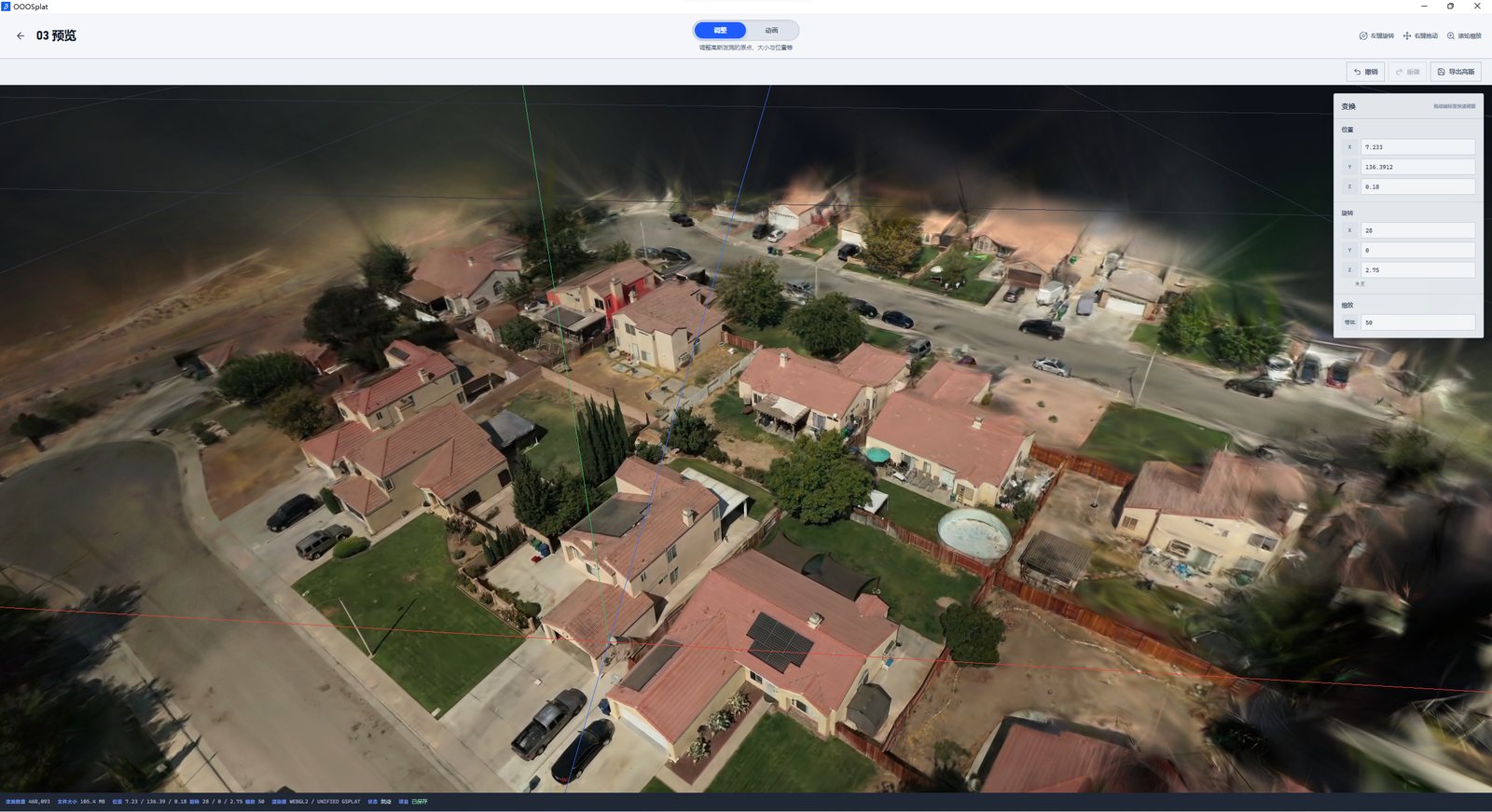
To measure the export rather than estimate it, I re-implemented write_html in Python, byte for byte from the Rust, and bundled the real viewer.ts with esbuild against [email protected], the version in their package.json (measured):
- The runtime bundle is 2,051,516 bytes minified, 528,616 gzipped. Their release builds it with Vite, so their exact size will differ a little.
- A 20,000-splat synthetic PLY of 4,721,476 bytes became a 9,046,808-byte HTML file. At 200,000 splats, 47,201,477 bytes became 65,690,265.
- The fixed overhead is 2,751,504 bytes, nearly all the base64 runtime. Past that, the file grows at four thirds of the PLY.
So the size of the HTML is the PLY times 1.33, plus 2.75 MB. Run their logged Detailed example through it and a 2,220,679-splat scene is a 524 MB PLY and a 701.5 MB HTML file (reasoned). That is not something you email, and the browser has to parse all of it as one document before the viewer starts. The same app exports SOG, which the site's SOG format teardown measured at 13.64 bytes a splat on a different scene; at that rate the same scene would be about 30 MB, though SOG then needs a host and a SOG-capable viewer rather than one file (reasoned, and an order of magnitude only).
The practical reading: the HTML export is the right tool for a cropped object of a few hundred thousand splats, the kind of thing you hand to a client on a USB stick. For a whole room at Detailed, crop hard first, or export SOG or SPZ.
I wanted to go one step further and load my generated HTML in headless Chromium to confirm the viewer draws it. The sandbox's permission layer refused to run the bundled third-party viewer, so I did not; the format above is from the code and my byte-level re-implementation, not from a rendered page.
"Fully local", read carefully
The post's last line is the selling point: the reconstruction runs on your own computer and the footage never goes to a cloud. That holds for the media. Frames, the COLMAP database, the Brush intermediates and the models stay in the project folder, and there is no upload step anywhere in the pipeline code I read.
It is not the same as "the app makes no network requests":
- Anonymous usage statistics are on by default.
telemetry/service.rssetsanalytics_enabled: truein its default config, and events go to an endpoint onooolab.cncompiled in fromconfig/telemetry-endpoint.txt(measured). The README lists what is sent: a random install ID, app version, OS, CPU architecture, preset, input type, stage durations, bucketed frame counts, error codes, registered-image and point counts, splat count, PLY size, GPU vendor and VRAM. It says no media, filenames, paths or logs are sent, and you can switch it off under Settings, Privacy (reported). I did not run the app, so I have not watched the traffic. - An update check reads
https://ooolab.cn/updates/latest.json(measured,updates.rs). - Error reports are opt-in per failure, with a redacted preview first (reported).
- An optional MCP server lets a local agent start jobs and export models. It is off by default, binds to 127.0.0.1 and has no token (reported). Any process on the machine can drive it while it is on.
None of that is hidden; the README documents all of it. But if "local" was the reason you picked it, turn the analytics off on first launch.
What it needs to run
Training needs a GPU. Brush runs on Vulkan on Windows and Linux and on Metal on Apple Silicon, so AMD and Intel cards work for training as well as NVIDIA; CPU-only software Vulkan "has not yet been validated end to end" (reported). COLMAP uses CUDA for SIFT only on NVIDIA with driver 580 or newer and compute capability 7.5 or higher, and otherwise falls back to the CPU, which is what I ran. On the macOS Alpha COLMAP is always on the CPU.
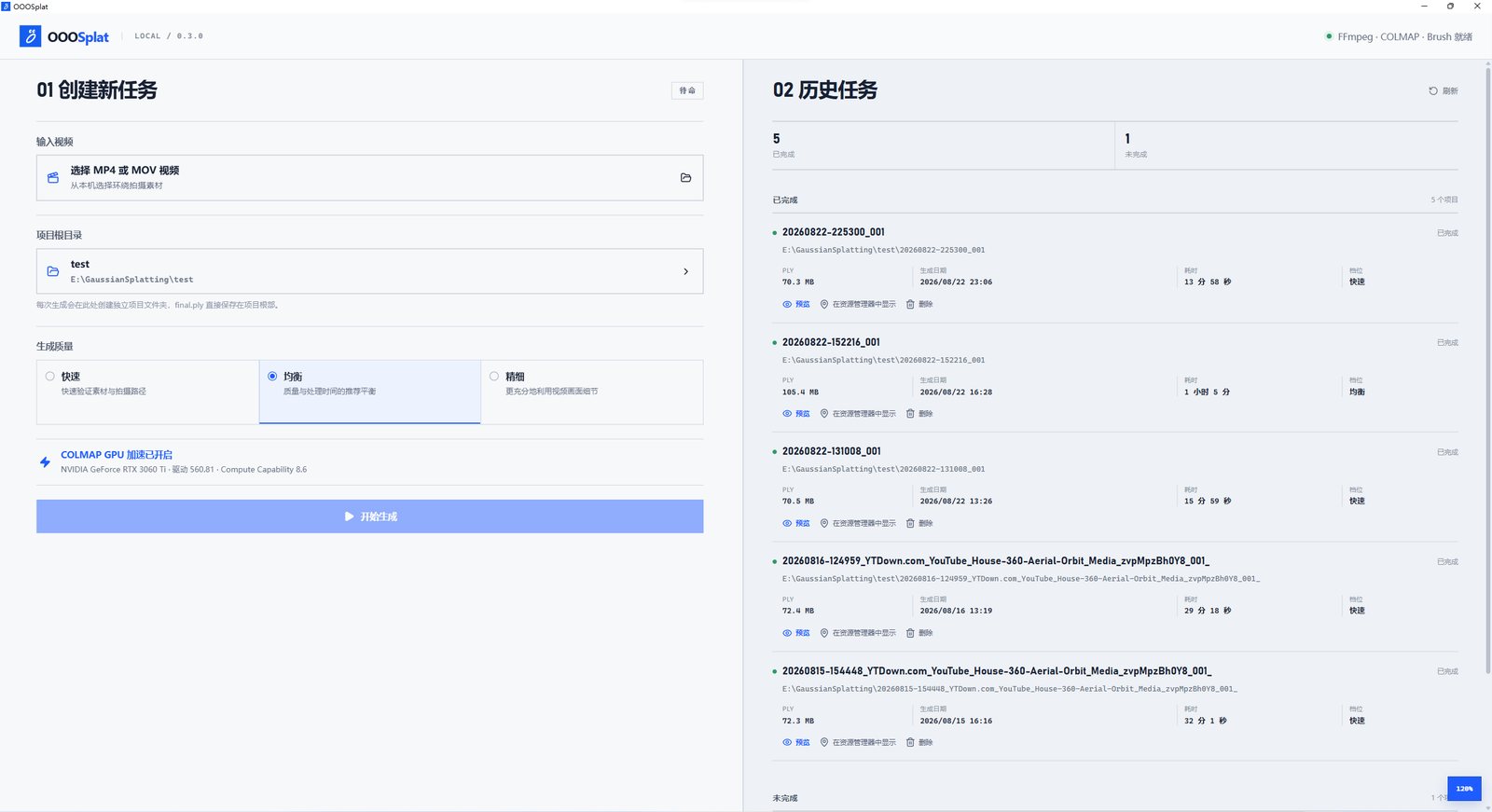
How long it takes is in the screenshot above, on an RTX 3060 Ti from an older build: 14 to 32 minutes for the four Fast runs, 1 h 5 min for the Balanced one (reported). I could not train anything; there is no GPU here, and I did not attempt to build the Tauri app, which needs WebKitGTK development libraries and a Rust build far larger than this sandbox's disk.
For where this sits among capture tools, the site's Gaussian-splat capture in practice covers the 360-camera end of the same pipeline, with LichtFeld Studio and Spirula Studio doing the training. OOOSplat is the opposite end: one phone, one button, sensible defaults.
Verdict
OOOSplat is a careful wrapper, and I mean that as praise. The reconstruction and training are COLMAP and Brush, pinned by commit and hash. The app's own contributions are the parts a one-button tool lives or dies on: a frame plan that never gives COLMAP fewer than 30 frames, a bridge-frame retry when registration falls short, a Detailed splat ceiling that I could reproduce exactly and that is far less sensitive to matching luck than the rule it replaced, an editor, and five export formats. Its docs record negative results, such as Caspar being slower on small scenes, which is rarer than it should be.
Two things to know before you rely on it. The standalone HTML is your float PLY in base64 plus a 2.75 MB viewer: about 1.33 times the PLY, so crop before you export, or use SOG for anything large. And "local" means your footage stays local; usage statistics go to the developer unless you turn them off.
What I measured: the COLMAP path on 30 synthetic frames, the pair counts, the ceiling formula against their own log, and the HTML format and sizes from a byte-for-byte re-implementation. What I did not: train with Brush, run the app, or render the exported HTML.
- license
- Apache-2.0
- branch
- main
- tests
- 10 files
- source
- 1.2 MB
- commit date
- 2026-10-03
by size of tracked source at this commit, file counts in brackets; docs, data and vendored trees excluded
local clone, 2026-11-10 at 1388f74 — branch, commit, commitDate, fileCount, hasTests, languages, license, licenseFile, shallow, testFileCount
shallow clone: counts describe the pinned tree, not the history