2026-11-13 · 27 min · agents · browser-automation · computer-use · rust · webassembly · infrastructure
A 3:27 narrated explainer, drawn in code. Every number and picture in it is this article's own; the sources are below.
› transcript
This is a web browser running entirely inside Cloudflare Workers. No Chrome, no container. It is called Kitesurf. Cloudflare built it for agents, and this week it went open source. Hi, I'm Skerry! I read Kitesurf's code to see which parts of a browser it kept, and what one page really costs. A browser does the same work in the same order. First it fetches. In Kitesurf one gateway Worker does every fetch. Then it parses HTML into a DOM, here Rust compiled to WebAssembly, in a fresh isolate for every page. Then the page's own JavaScript runs. Hold that thought. Then style and layout, with Servo's CSS engine. The page isolate also records the scene to draw. For a screenshot, a second isolate replays that scene into pixels on the CPU. Real pixels, no GPU. For plain text, it never starts. Last, it encodes a PNG or JPEG, or writes a vector PDF. Cloudflare's own diagram. The engine is the only part that keeps state, and only for one WebSocket session. Every frame is a call to the renderer, which pulls the scene and sends back JPEG bytes. It holds nothing, so it can be killed and reloaded any time. Workers forbid eval, so a browser cannot just hand page code to V8 at runtime. Kitesurf splits the scripts in two. Scripts it finds in the HTML, it fetches and bakes into the code the page's Dynamic Worker is created from. V8 runs those natively. A script the page inserts later cannot be baked in time. It runs on Boa, a JavaScript interpreter compiled to WebAssembly. So does anything an agent sends over CDP. Every page dot evaluate from Puppeteer runs on the interpreter. On the next page of the same session, the chunks it learned are baked too, and V8 takes over. Because the renderer only reads a scene, it can live somewhere else. Here it runs in a terminal. The page still executes on Cloudflare. To work with Puppeteer and Playwright, it speaks the Chrome DevTools Protocol. The version it pins has fifty-eight domains. Fifteen are routed, with a hundred and eleven methods handled. Thirty answer every call with an empty success. Thirteen say not found. For most agent work that is enough. Here an agent lists a page's WebMCP tools through it. But the empty success is the trap. A script that sets a time zone is told it worked. Cloudflare's benchmark says the design pays off in memory and CPU on the median page. It loses on wall time, and heavy news pages flip the CPU win. Here is the formula. But nobody bills that memory. Host it yourself and each screenshot loads at least two Dynamic Workers. The price list charges for every one created. So the creation fee is the bill. At ten thousand screenshots a day, about twelve hundred dollars a month. And yes, it runs Doom. Kitesurf is a real browser built from isolates. Cheap for Cloudflare to run, free in beta, and not yet cheap to host yourself. Baked scripts on V8, the rest on Boa. A partial protocol. And a bill set by isolates. Thanks for watching! Every source is in the full article. I'm Skerry. Bye!
Why read this
Hightop 30%Reads Kitesurf's source to show which browser stages run where, counts its CDP surface, and prices a self-hosted page from the published units.
- Original analysis
- A lasting reference
- A new technique
Agents & harnessesAPI onlyApache-2.0Practitioner teardown
How this was scored
- Is it new?
- 2 of 3: A real new idea, method or capability
- Can I trust it?
- 2 of 3: Measures key facts from files, code or configs
- Can I run it?
- 2 of 3: Open code or weights with real limits
- Will I understand it?
- 2 of 3: Mechanism from first principles with figures
- Can I act on it?
- 2 of 3: A concrete recipe, numbers or comparison
- Will it last?
- 2 of 3: A reference for a year or more
- Does it affect many?
- 1 of 3: A specialist community
- Only here?
- 2 of 3: A teardown or measurement few others did
Score 67 of 100, ranked 222 of 740 rated articles. Each question is answered 0–3 by hand, and a 3 is rare. How articles are scored
On 12 November Cloudflare's changelog said Kitesurf, its "browser engine for AI agents", is now open source under Apache-2.0 at github.com/cloudflare/kitesurf. It was first shown on 6 August in an introductory post, which said the first commit was in May, and again on 28 September in an update. Until this week you could use it only as a service: through Browser Run, Cloudflare's hosted browser product (the one previously called Browser Rendering), the public playground, and since September a terminal client.
The post that sent me to it, in Chinese, sells it on three jobs. Give an agent an eye: a URL in, a screenshot or a PDF out, for daily reports, page monitoring and images for multimodal models. Pull text out of pages in bulk, the "open, take, close" jobs that are stateless, run in parallel and are cheap to bill. And swap the backend under an existing Puppeteer, Playwright or MCP script by adding browser=kitesurf to the connection URL.
I cloned the repository at commit 4a29038 and read it. I did not build it, deploy it or point a client at it, so every runtime number here is Cloudflare's, and I say which page it is from. What I could do from the source is answer the questions the launch posts skip: which parts of a browser it kept, which JavaScript engine runs what, how much of the DevTools protocol is really there, and what a page costs on the units Cloudflare actually bills.
Kitesurf is an experimental browser engine that runs on Cloudflare Workers.
- license
- Apache-2.0
- branch
- main
- forks
- 10
- open issues
- 34
- source
- 10.1 MB
- commit date
- 2026-11-13
GitHub REST API, 2026-11-13 — branch, commit, commitDate, createdAt, description, forks, homepage, languages, license, openIssues, pushedAt, stars, topics
What a browser does before it can hand you a picture
A browser turns a URL into pixels in a fixed order. It fetches the document and everything it links to. It parses the HTML into a DOM tree. It runs the page's JavaScript, which may rewrite that tree, fetch more data and insert more scripts. It resolves CSS into a computed style for every element (the cascade). It lays the boxes out: widths, line breaks, positions. It paints, which means recording a list of drawing commands for each box and glyph. It rasterizes those commands into pixels, and it composites layers into a frame. For a screenshot you then encode the frame as PNG or JPEG. For a PDF you skip the pixels and write the drawing commands out as vectors.
An agent that wants the text of a page needs the first three steps and sometimes the next two (a script that measures an element forces layout). An agent that wants a screenshot needs all of them, once. Nobody needs frame 2.
Chromium is built for the person who does. It splits the work across processes: a browser process that owns the network service, a renderer process per site that runs Blink and V8, and a GPU process that rasterizes and composites. That split is the security model for a human visiting sites they did not write, and it is memory. On Cloudflare's own benchmark page, run on 13 November, one cold Chrome rendering one page held a median 329 MiB (proportional set size over its process tree) for a screenshot and 317 MiB for HTML, and needed a median 172 ms just to become ready for CDP before any page work started. That boot time is excluded from its wall-time numbers. V8 brings a JIT that is excellent on the hundredth page and wasted on the first. And the compositor keeps producing frames for a viewport no one is looking at.
Cloudflare's introductory post states the trade it wanted directly: agents "will be just fine if the CSS parsing is slightly off or the rendering isn't pixel perfect", and care about "token count, context windows, scalability, performance, and costs".
Three kinds of Worker and one way out
Kitesurf runs entirely on Workers, as an ordinary customer application would. Its README lists the pieces: Blitz for HTML parsing, the DOM, layout and painting; Stylo, Servo's and Firefox's CSS engine, for the cascade; Boa for JavaScript that has to be interpreted; Linebender's Parley, Vello, Kurbo and Peniko for text and 2D graphics; and Krilla for PDF. Layout inside Blitz is Taffy. All of it is Rust compiled to WebAssembly with wasm-bindgen, and Cloudflare patches it heavily: scripts/patches/ holds 193 patch files against 21 vendored crates, 73 of them against blitz-dom, 28 against blitz-paint and 26 against boa_engine.
On the files tracked at 4a29038 I count about 160,000 lines of source (46,618 Rust, 113,311 TypeScript) and 92,000 lines of tests, plus 15,000 lines of tooling scripts. The engine package alone has 563 end-to-end test files.
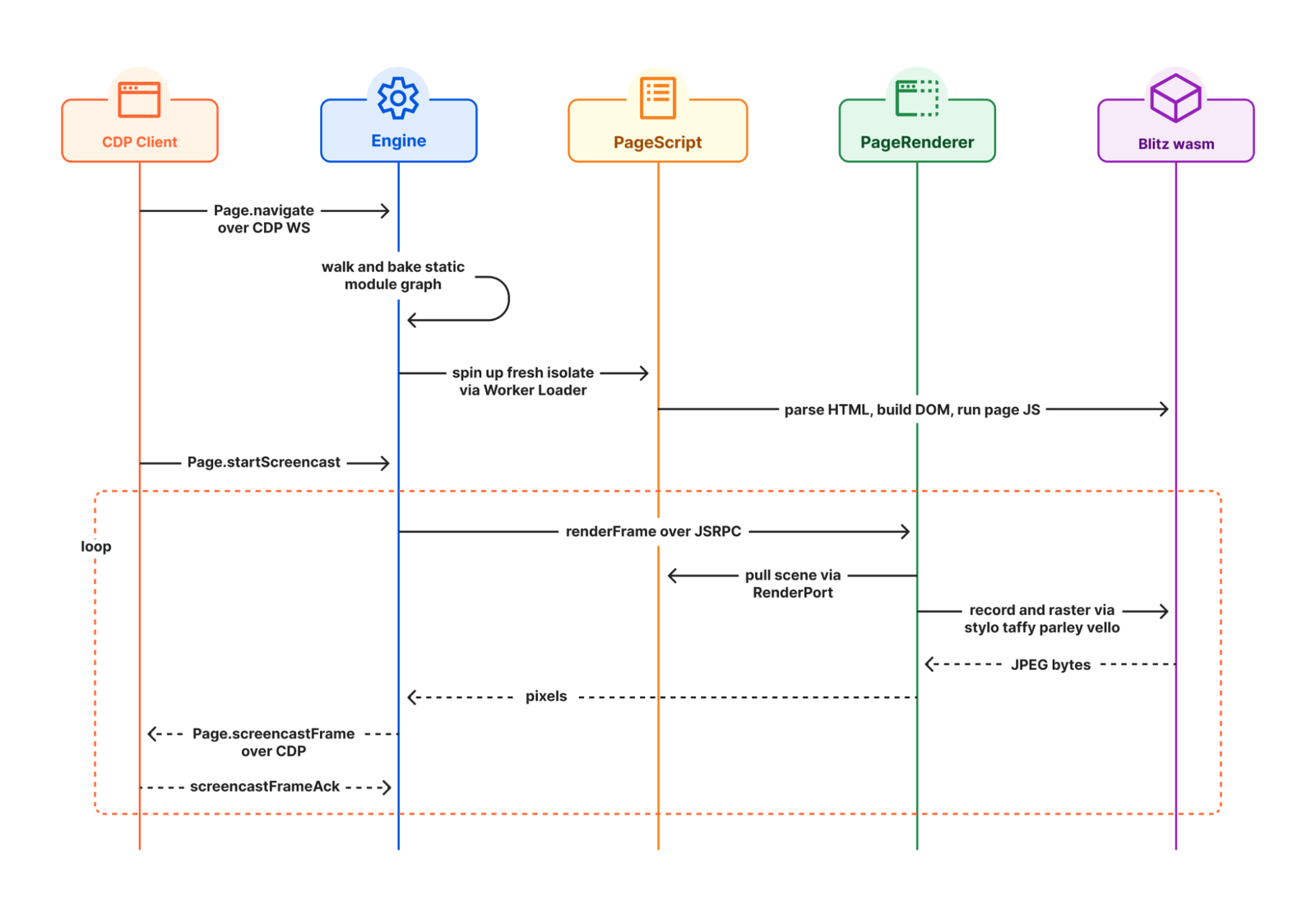
Four components share the work, and only one holds state.
The Engine is the public Worker. It speaks CDP over a WebSocket and a small HTTP API, and keeps each session's state in the closure of handleWebSocket. AGENTS.md is blunt about it: "no Durable Object holds it and nothing persists across connections." When the socket closes, the browser is gone.
PageScript is a Dynamic Worker, an isolate the engine creates at runtime from code it passes in. For every Page.navigate the engine calls env.LOADER.load(...) with a fresh bundle and kills the previous one; the repository's rules say "Use load(), never a named LOADER.get". The isolate gets a clean globalThis, a DOM shim written in TypeScript, and the Rust DOM in Wasm. Its network goes through a globalOutbound binding, and it runs under per-isolate CPU and subrequest caps (KITESURF_PAGE_CPU_MS_CAP, KITESURF_PAGE_WALL_MS_CAP).
PageRenderer is a second Dynamic Worker that turns a recorded scene into pixels. It holds no page state, so the engine can kill and reload it whenever a render call stalls.
SandboxOutbound is the only thing allowed to touch the internet. It enforces CORS, adds browser-shaped headers, keeps each page's cookies in its own jar, and refuses anything else with a 403. The renderer gets a DeniedOutbound binding instead: fonts and images reach it through the engine, so it has no network path at all.
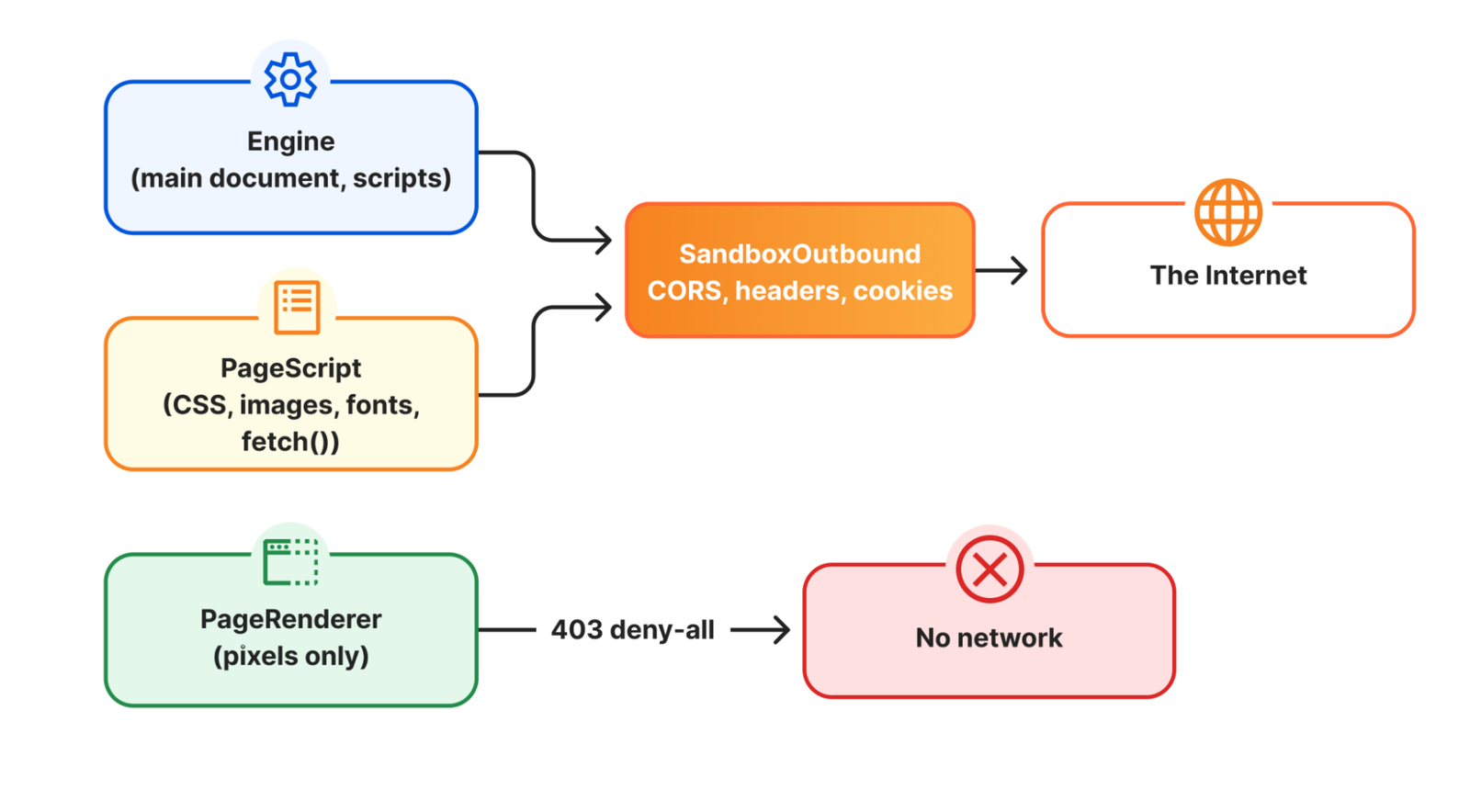
A session can hold at most four Dynamic Workers at once (MAX_DYNAMIC_WORKERS = 4 in eval/worker-budget.ts), with one slot reserved for the renderer and one for navigation headroom. A cross-origin iframe and a page's new Worker() each take a slot of their own, and only one out-of-process iframe runs at a time.
Two JavaScript engines in one page
The obvious way to run page JavaScript in a Worker is to hand it to V8 with eval. Workers forbid runtime code generation, so that path is closed, and Kitesurf works around it in two directions.
Scripts it can see before the page starts, it compiles ahead of time. While handling Page.navigate, the engine fetches the document, finds its <script> tags, walks the static module graph and bakes the classic scripts into one module and the ES modules into a module table (eval/script-bundle.ts, eval/walk-module-graph.ts). That bundle is part of the code the Dynamic Worker is created from, so V8 compiles and runs it like any Worker code, JIT and all. The same trick covers WebAssembly: the engine prefetches the page's .wasm files and bakes them in as modules.
Everything that only exists at runtime goes to Boa, an ECMAScript interpreter written in Rust and compiled into the same Wasm as the DOM. That covers eval, new Function, a computed import(), scripts the page inserts after parsing, and every CDP call that carries source text. AGENTS.md lists Runtime.evaluate first, and eval-helpers.ts says what happens in practice: "Native eval is only a probe; workerd's code-generation EvalError falls back to Boa." The introductory post calls this "a runtime on top of a runtime", and says Kitesurf will move off Boa when Workers gets native eval.
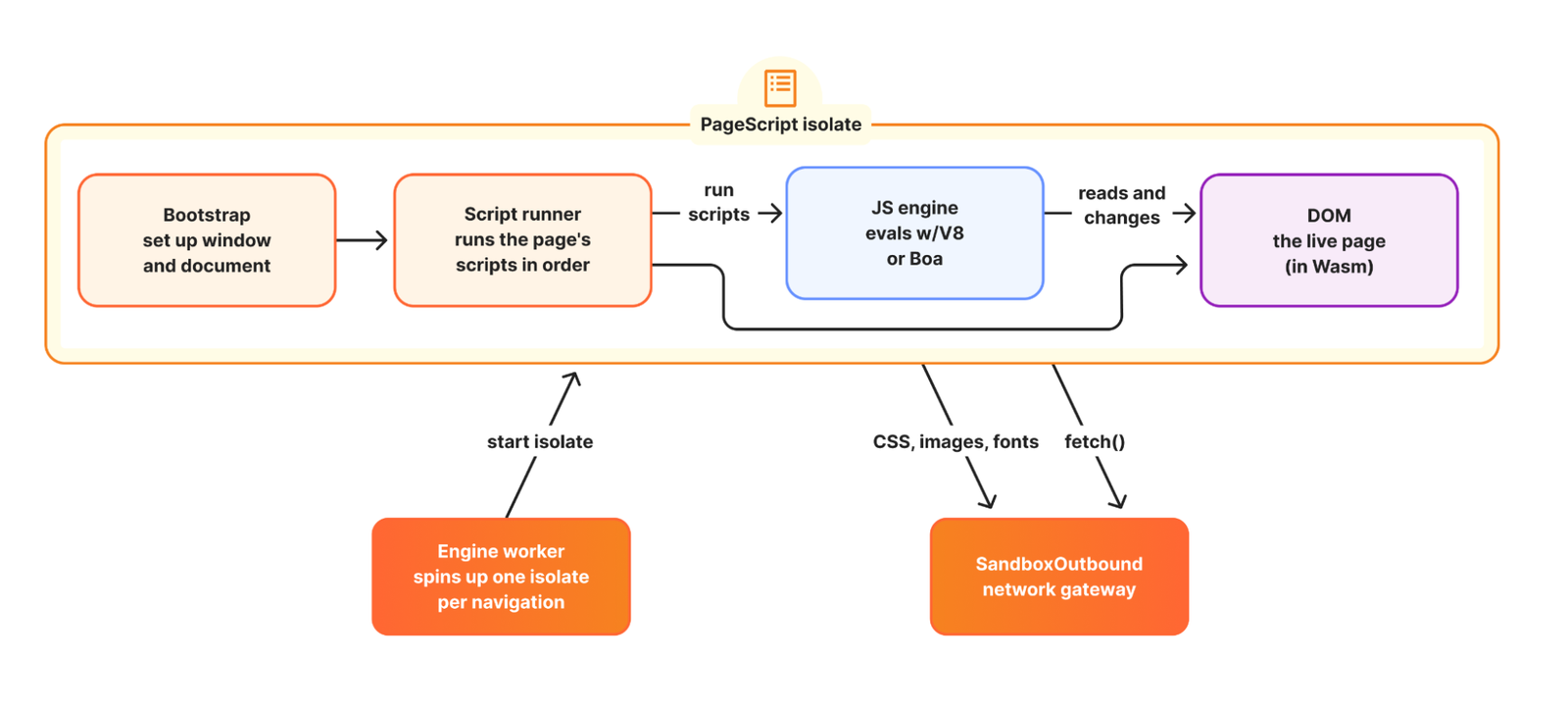
There is a learning step between the two. eval/learned-scripts.ts records which inserted scripts a page loaded, per browser context and origin, and on a later navigation to that origin in the same session the engine prefetches the ones of at least 8 KiB (MIN_LEARNED_BYTES = 8 * 1024, up to 24 URLs per origin) and bakes them too. Nothing is learned across sessions, since nothing outlives the WebSocket. inserted-scripts.ts then runs each insert one of three ways, logged as baked, boa or stale (baked, but the source changed). A single-page app's chunks run on Boa on the first page of a session and can run on V8 on the next.
This matters for agents in a way the launch posts do not mention. Puppeteer's page.evaluate, page.$eval and Playwright's locators all ship a function's source over CDP (Runtime.callFunctionOn or Runtime.evaluate). In Kitesurf every one of those runs on an interpreter inside Wasm, not on V8: callFunctionOn in page-script/src/index.ts builds the function with new Function, catches workerd's "Code generation from strings disallowed" error, and runs the same source on Boa. For a selector query that is irrelevant. For an agent that evaluates a large extraction script on every page, it is the slow path by design. The September update describes work to make common reads (getAttribute, id, parentNode) answer "inside the Wasm DOM instead of making repeated Boa → JavaScript shim → Wasm trips".
Pixels without a GPU
When the engine needs a frame, it calls renderFrame() on the renderer over Workers RPC. The renderer pulls the scene from PageScript, fetches the fonts and images it does not have from static assets, replays the scene into pixels with vello_cpu in Wasm, and returns PNG or JPEG bytes. The scene is recorded on the PageScript side: page-script/src/paint.ts says "PageScript records scenes but never rasterizes them; PageRenderer pulls and replays them", so blitz-paint and Parley's text shaping run next to the DOM, and the renderer's Wasm (packages/renderer-core) is only the decode, replay, raster and PDF slice of the core. The August post describes blitz-paint under PageRenderer; the current code has moved it. This is real rasterization of a real layout, on the CPU, not a text dump or a subset; it is also where the time goes. The introductory post attributes most of Kitesurf's wall-time gap to "rasterization and JPEG/PNG encoding".
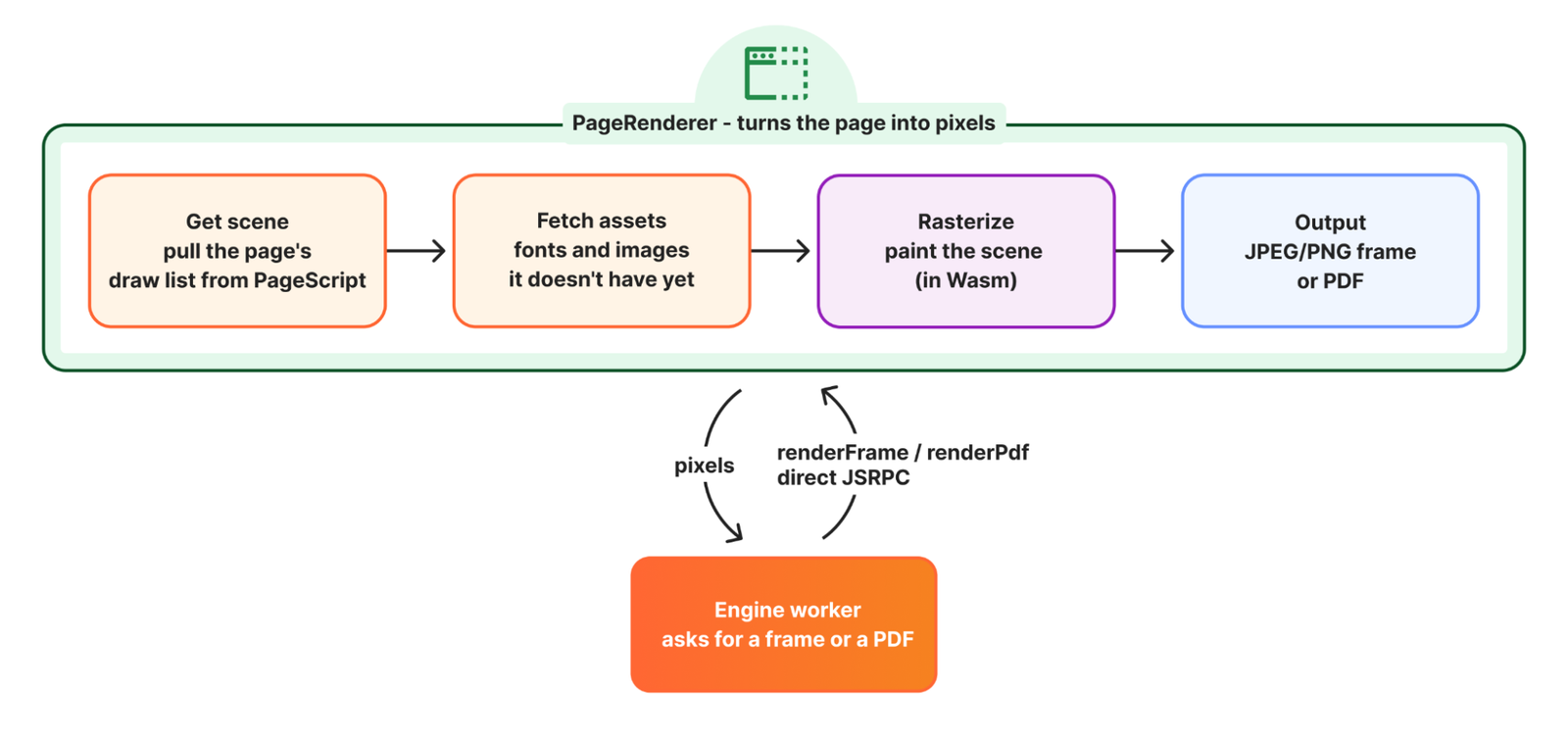
A PDF takes the same scene through renderPdf instead, and Krilla writes it as vector PDF, so the text stays text. Page.printToPDF sets print media, reads @page boxes and margins, waits for pending resources, and calls the renderer.
For HTML extraction none of the pixel half happens. A client can send the header x-kitesurf-skip-raster: 1, and the session goes "pixel-free": no speculative rasters, and the font loader fetches shaping-only font files. An end-to-end test, renderer-laziness.e2e.test.ts, checks that a session which only calls DOM.getOuterHTML never loads a renderer isolate and rasterizes nothing. Style and layout still run inside PageScript when something needs geometry, behind a dirty flag (ensure_layout in packages/core/src/lib.rs).
The widget lays out which stages run for each task, and next to it what Cloudflare's benchmark measured for that task on any of its 38 pages.
Because PageScript and PageRenderer talk through a scene protocol, the renderer can live somewhere else. The September update moved it into a terminal client (brew install cloudflare/cloudflare/kitesurf) that draws the scene with the Kitty graphics protocol or plain ANSI, while the page itself still runs on Cloudflare.
How much of the DevTools protocol is there
Kitesurf speaks CDP so that existing clients work. The router is one function, dispatch() in packages/engine/src/cdp/dispatch.ts, with a switch on the domain and a handler file per domain. I counted the case "Domain.method" labels in those files and checked each against devtools-protocol 0.0.1669207, the version the repository pins, which defines 665 commands in 58 domains. I called a method handled when its case has a body that does something other than return an empty object. That is a count of code, not of correctness.
- 15 domains are routed: Accessibility, Browser, CSS, DOM, Debugger, Emulation, Fetch, Input, Log, Network, Page, Runtime, Storage, Target and WebMCP. Between them, 111 methods are handled and 46 are accepted on purpose as no-ops (
Page.handleJavaScriptDialog,Network.setCacheDisabled,Input.dispatchTouchEvent,Runtime.awaitPromiseand so on). - Any other method in those 15 domains also falls through to
return {}. - 30 more domains, from Animation to WebAuthn, are listed in the dispatcher with the comment "These domains remain unsupported; clients probe them during attach" and answer every method with
{}. - 13 domains (Extensions, CacheStorage, SystemInfo and others) are not routed and return the protocol's -32601 "wasn't found" error.
- A vendor domain,
Kitesurf.*, adds 29 methods of its own for scene streaming, layout modes and memory stats.
Browser.getVersion answers Chrome/145.0.0.0 with revision @kitesurf, so a client that sniffs the version sees a Chrome.
The empty success is the design choice that will bite. A client that calls Emulation.setGeolocationOverride or Emulation.setTimezoneOverride is told it worked; only three Emulation methods are implemented (device metrics, emulated media and user agent). A tool that builds its page model from DOMSnapshot.captureSnapshot gets {} back instead of an error it could fall back from. JavaScript dialogs are accepted and ignored.
PDF through a client library is the one case I traced end to end in someone else's code. Puppeteer's page.pdf() (I read puppeteer-core 25.16.0, the version the repo pins) sends Page.printToPDF with transferMode: 'ReturnAsStream', then asserts that the reply has a stream handle and reads it with IO.read. Playwright 1.56's Chromium PDF path does the same. Kitesurf's printToPDF ignores transferMode and returns base64 data, and the IO domain is one of the stubs, so by my reading that assertion fails. I did not run it. PDFs through Browser Run's Quick Actions endpoint do not go through a client library, and the docs list PDF generation as a fit.
The repository measures its client compatibility on the clients' own test suites, with patches that point them at a running engine. Ten Puppeteer test files are enrolled (tests/pptr-tests.json: click, elementhandle, evaluation, injected, jshandle, locator, navigation, queryhandler, queryselector, waittask), with 79 tests expected to fail or skip. For Playwright, 123 spec files are enrolled with 619 expected failures or skips, 175 of them skipped as time-outs. Neither manifest records the total number of tests, so I cannot turn those into pass rates without running the suites.
So the third claim in the post holds with a scope. On Browser Run, browser=kitesurf on the CDP endpoint, /devtools/browser?browser=kitesurf, does switch Puppeteer, Playwright and chrome-devtools-mcp to Kitesurf, as the docs say. Whether a given script keeps working depends on which of the 665 commands it uses.
The September update added WebMCP: a page can expose tools such as navigate-to or set-location, and an agent connected through chrome-devtools-mcp calls them instead of clicking. Kitesurf routes it as a CDP domain with four handled methods.
The numbers are Cloudflare's, and they moved
Every performance number in the launch material comes from Cloudflare's own harness. There are two sets, and they disagree in the details.
The introductory post's table (6 August, repeated in the docs) is the median of five Browser Run Quick Action runs over a 14-URL corpus, Kitesurf against a warm Chromium pool. Kitesurf used 380 ms of CPU for a screenshot against 1,173 ms, and 57.8 MiB against 271.0 MiB; for HTML extraction, 229 ms against 877 ms and 39.4 MiB against 273.7 MiB. Wall time went the other way: 1,148 ms against 637 ms for a screenshot and 820 ms against 472 ms for HTML. The post sums it up as "3-7x" less of what "actually drive[s] your bill".
The live page at kitesurf.dev/benchmarks is newer and better. Its run of 13 November covers 38 pages, adds a Chrome started fresh for every render next to Browser Run's reused Chrome, and publishes the raw JSON. Its medians: a screenshot takes 1.20 s in Kitesurf, 820 ms in Browser Run and 1.01 s in a cold Chrome; it uses 361 ms of CPU against 1.33 s and 747 ms; it holds 54 MiB against 389 MiB and 329 MiB. For HTML: 850 ms, 709 ms and 888 ms of wall time; 239 ms, 1.21 s and 610 ms of CPU; 34 MiB, 375 MiB and 317 MiB.
The per-page data changes how I read that headline in three ways.
The CPU ratio depends on the opponent. Against Browser Run's container the screenshot CPU ratio is about 3.7x; against one fresh Chrome it is about 2.1x. The page itself explains why: Browser Run's figure is container-level CPU, and the cold-start figure is Chrome plus the Node driver.
The median hides the heavy pages. I went through the per-page rows. Kitesurf used more CPU than a cold Chrome for 11 of the 38 screenshots, and the gap is not small: The Guardian took 4,166 ms of CPU against 1,611 ms and 6.30 s of wall time against 1.06 s in Browser Run; El Mundo 7,477 ms against 5,042 ms and 9.86 s of wall time; one trysansa product page 7,051 ms against 1,188 ms. Its screenshot beat Browser Run's wall time on 11 of the 35 pages Browser Run rendered (it failed three). It wins clearly on small, script-light pages: Hacker News took 613 ms against 1.35 s, the five TodoMVC apps took 490 to 650 ms each.
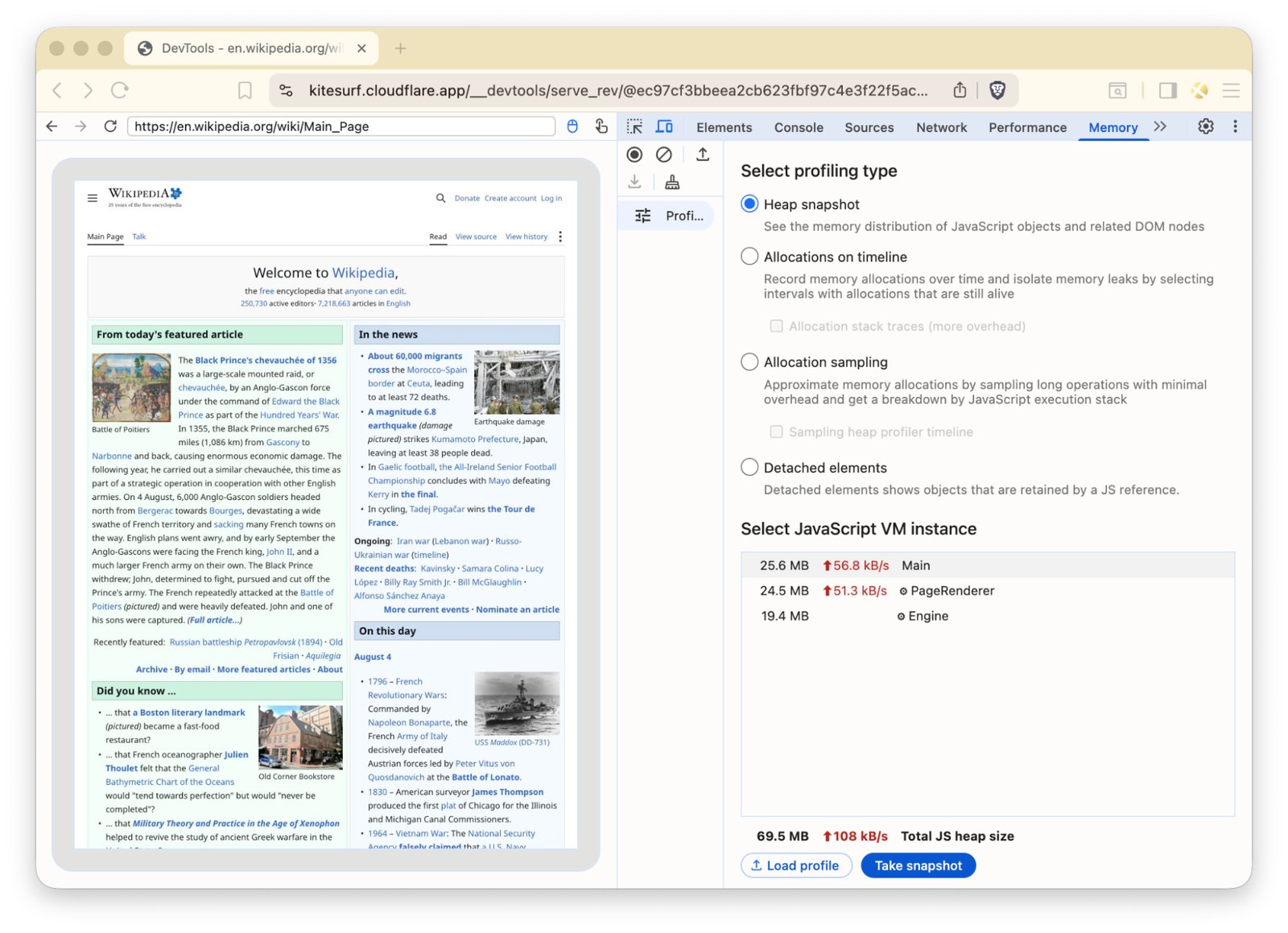
The memory numbers are different measurements. The page says so: Kitesurf's is the sum of its engine, page and renderer isolates, and Chrome's is PSS across its process tree. Both are "memory at capture", and the ratio (about 7x on the median screenshot) is a fair order of magnitude, not a like-for-like figure. The playground shows the split directly, because Kitesurf answers the DevTools Memory panel with one heap per isolate.
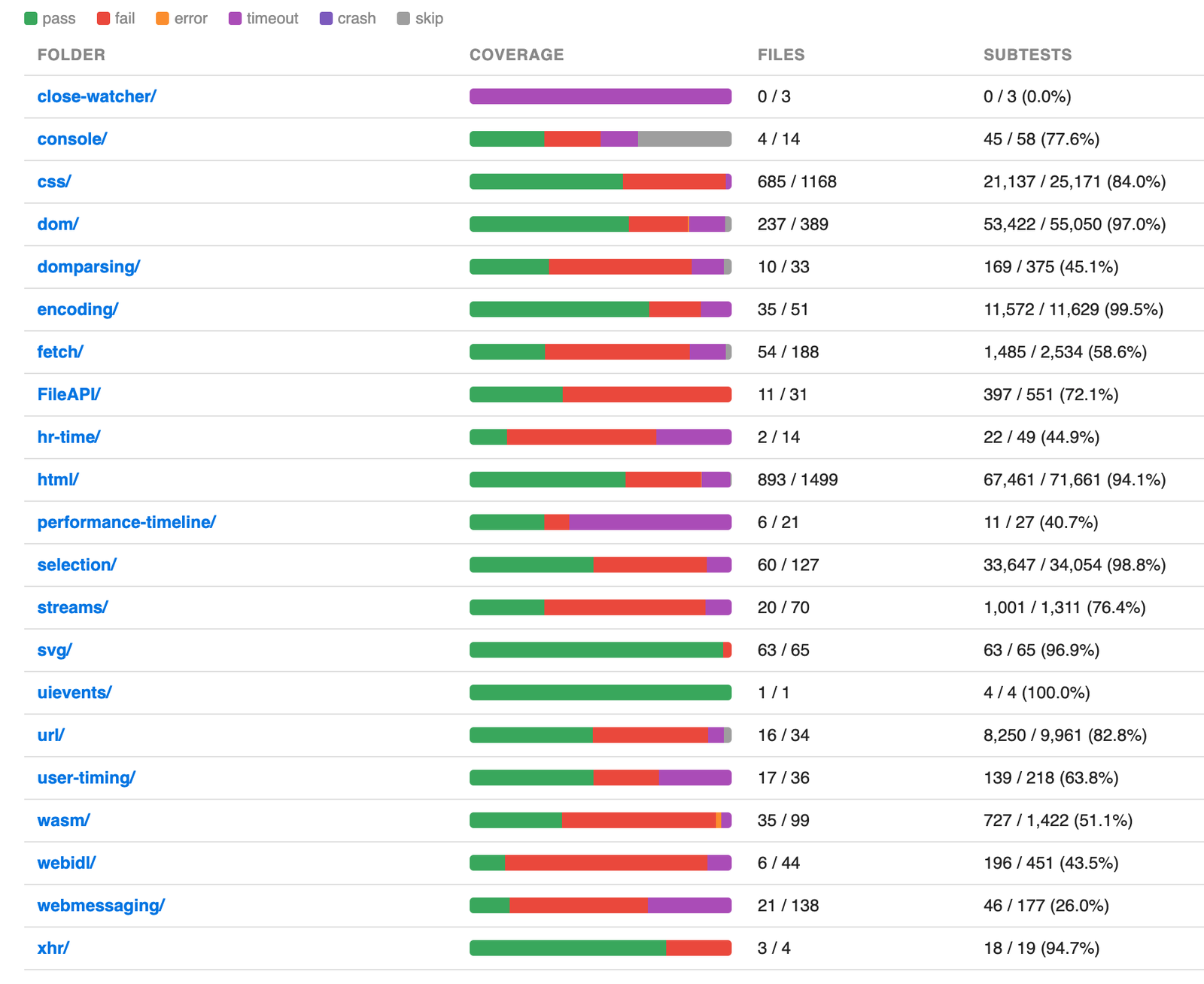
The web-platform-test numbers moved more. The introductory post claimed "around 215,000+" passing tests on 6 August. The update claimed "730,000+ WPT subtests" on 28 September. The docs page, last updated 6 October, says "over 235,000 subtests". The live WPT page, for the run of 12 November, says 1,517,208 of 1,543,968 subtests pass, 98.3%. That percentage has two denominators worth knowing. It is measured on an allow-list of 11,795 enrolled test files (tests/wpt-tests.json; 31 of them are marked skip, leaving 11,764), while 56,854 files of the corpus are not enrolled, and the page itself puts 470,593 subtests in those by Chrome's count. And the encoding/ folder alone contributes 1,139,877 of the passing subtests. Without it, my arithmetic gives 377,331 of 404,064, or 93.4%. By whole test files, 9,093 of the 11,764 pass: 77.3%.
The docs give their own list of what renders correctly: TodoMVC in vanilla JavaScript, React, Vue, Angular and Preact, Wikipedia, Hacker News, the Cloudflare Blog and much of the Cloudflare dashboard. And what does not work yet: video, WebGL, "a bot-challenge handshake with real TLS fingerprints", and long authenticated sessions that need persistent state.
Stateless is the product
The second claim in the post, that the "open, take, close" jobs suit it best, is the one the architecture supports most directly. A session is a WebSocket. Every navigation gets a new isolate, and the renderer is disposable. Nothing persists after the connection closes, and a crash costs a reload. The introductory post makes it a rule: "any failure degrades to a blank frame or a missing element, never a dead session." Rust panics in the Wasm are compiled to unwind rather than abort (packages/core/.cargo/config.toml), so a panic in layout does not take the DOM with it.
That design gives up exactly what the docs list as missing. A long logged-in session wants cookies and storage that outlive a connection. A bot challenge wants a real Chrome's TLS fingerprint. The engine does carry a web-bot-auth signer: if you configure an Ed25519 key, outbound requests are signed with Web Bot Auth headers, which announces the agent rather than disguising it.
"Concurrent" is a statement about the platform more than the engine. Isolates are cheap to create, which is the reason to build a browser on Workers at all. What I could not find is a published concurrency limit for Kitesurf on Browser Run beyond "per-account limits" while in beta. Browser Run's default limits for Chromium on Workers Paid are 30 Quick Action requests a second and 200 concurrent browsers per account.
What a page costs, and on which unit
The post's third adjective, cheap to bill, is the one I would push back on, because the bill is not computed from CPU or memory on any product that runs Kitesurf today.
Browser Run bills Chromium by wall time. Its pricing page charges browser hours, the time a browser is open, with 10 hours a month included on Workers Paid and $0.09 an hour after that; browser sessions also pay $2.00 per concurrent browser above 10. CPU and memory do not appear. Browserbase, the best-known hosted Chromium for agents, bills the same unit, at $0.12 or $0.10 per browser hour past its plans' allowances. On that unit a backend that is 1.46x slower on the median screenshot costs 1.46x more.
Kitesurf on Browser Run is free while in beta, "behind per-account limits". No post-beta price is published. If Cloudflare kept the browser-hour unit, Kitesurf would cost more per screenshot than its own Chromium, so I expect a different unit, but that is a guess.
Self-hosting is billed by the Workers platform. That is CPU time (30 million ms a month included, then $0.02 per million), requests, and, because the engine needs the Worker Loader binding, Dynamic Workers. The Dynamic Workers pricing page includes 1,000 a month and charges $0.002 for each one created after that, and its table says a .load(code) call counts as one new Dynamic Worker per invocation. Kitesurf calls load() for every navigation and once more for the renderer when a session needs pixels, so a screenshot is at least two Dynamic Workers ($0.004) and an HTML extraction at least one. Those are floors read from the code: a cross-origin iframe or a web worker adds one each, and so may the lazy about:blank isolate a new target gets when a client evaluates before navigating. Against that, the median screenshot's 361 ms of CPU costs about $0.000007. The Dynamic Worker fee is the bill.
At 10,000 screenshots a day, my arithmetic on those price lists gives about $5.22 a month for Browser Run's Chromium (68 browser hours), nothing for Kitesurf on Browser Run during the beta, and about $1,200 a month for Kitesurf on your own account, of which $1.57 is CPU. Per screenshot, the self-hosted fee is about two hundred times Browser Run's Chromium charge.
None of this says the engine is inefficient. The CPU and memory numbers explain why Cloudflare can afford to give it away during a beta. They do not reach a self-hosting customer, whose bill is set by how many isolates are created. Self-host it for control, auditing or data residency, not to save money.
Where it sits among the light browsers
Kitesurf credits obscura as its starting point, "a headless engine written in Rust for AI automation". Obscura runs real JavaScript on V8 and speaks CDP; its README now advertises screenshots, screencasts and PDF export through an optional rendering build, and it claims 30 MB of memory against 200+ MB for headless Chrome. Those are its numbers on its own setup.
Lightpanda, written in Zig, is the other well-known engine for agents. It also embeds V8, speaks CDP and WebDriver BiDi, and uses Servo's html5ever parser. Its README lists "No graphical rendering engine" as a design choice and describes its --dump png and --dump pdf output as "a text-only rendering". Its benchmark, its own, has 100 pages taking 123 MB peak and 5 s against 2 GB and 46 s for headless Chrome on an EC2 m5.large. The contrast is clean: Lightpanda decided an agent does not need layout and paint, and Kitesurf decided it does, at least for screenshots, and pays for it in wall time.
Kitesurf is also the nearest thing I know of to a Servo-derived browser in production. It does not use Servo itself, but its CSS engine is Servo's Stylo, its parser stack is Servo's, and Blitz was built as a modular renderer out of those parts. Cloudflare's patch series is a large, public stress test of those crates on real pages.
Headless Chromium, whether on your own machines or hosted by Browser Run or Browserbase, is still the default for anything Kitesurf lists as missing, and for any script that depends on the long tail of CDP.
It also helps to ask whether the agent needs a browser to look at at all. Vercel's UI SDK bridge drives a page through each component's own API and skips the screenshot; agent-desktop reads the accessibility tree; BrowserSkill borrows a person's real, logged-in tab for the sites where a fresh isolate will never get in. At the other end, a vision-only agent like Fara 1.5 needs exactly the screenshot Kitesurf is cheapest at producing when the page is simple. The network design will look familiar if you have read how Claude Code's sandbox routes everything through one proxy, and AnyAPI's scrape router is the per-1,000-pages pricing view of the same bulk-extraction job. Cloudflare's other recent open-source agent piece, Cloudflare OS, puts its gate on the agent's writes rather than on its network.
Where I would use it
For screenshots and text of ordinary pages through Browser Run, I would switch on browser=kitesurf now: it is free during the beta, the median page is within half a second of Chromium, and if a page renders wrong you drop the parameter. I would not move a Puppeteer script that calls page.pdf(), sets geolocation or time zone, or evaluates heavy extraction code on every page, without testing that exact script, because the first fails by my reading, the second silently does nothing, and the third runs on an interpreter. I would not self-host it to save money at any volume the price list knows about.
The engine is the more interesting artefact than the product. Baking the scripts it can see into Worker code and interpreting the rest is a clever answer to a platform that forbids eval, and the scene protocol that lets the renderer move to a terminal is a design I expect to see copied.
What I ran and what I read
I cloned cloudflare/kitesurf at 4a29038 and read it; I did not build, deploy or run it, and ran no client against it. The CDP counts come from a script that parsed the case labels in packages/engine/src/cdp/*.ts against devtools-protocol 0.0.1669207, and the line counts from the tracked files at that commit. Every timing, memory and WPT figure is Cloudflare's, from its two blog posts, its docs and the raw JSON behind kitesurf.dev on 12 and 13 November; the per-page counts (11 of 38, 11 of 35) are mine from that JSON. The Puppeteer and Playwright PDF paths I read in their published packages. Prices are from Cloudflare's Browser Run, Workers and Dynamic Workers pricing pages and Browserbase's pricing page as of 13 November, and the monthly figures are my arithmetic on them. The clips and diagrams are Cloudflare's, from its two blog posts.