Claude artifacts as desktop apps, and WebMCP in the AI SDK: the page is now the app and the tool surface
mdjsonmcp2026-11-25 · 16 min · agents · mcp · tool-calling · generative-ui · developer-tools
A 2:26 narrated explainer, drawn in code. Every number and picture in it is this article's own; the sources are below.
› transcript
An artifact, built in a chat. One click on Install as app. Now it opens in its own window, with its own icon, like any other app on the desk. Hi, I'm Trolley. Two launches on one evening, both about what a web page can be. What the app may touch is up to you. By default an installed app can do only what a browser page can. It can ask for more: notifications, global shortcuts, a menu bar item. Or full access to run programs and change files. Claude asks again after every update, even your own edits. One person posted sixty-one apps made this way. A crystal plate scorer. A knitting chart. A glacier traced year by year. A sailing passage with a tide gate. Each one a dense, single window. The page registers its functions as tools on document model context. Before each request, the browser lists them and sends the definitions to your server. The model runs on the server, key and all. It answers with a tool call, but the server has no way to run it. The browser does. The call goes through the MCP client and its WebMCP transport into the page's own function, and two mugs land in the cart. The result goes back as structured content, and the chat sends itself again for the next step. In the AI SDK it is one transport. Pass it the page's model context. List the tools, call one. There is no server on the other end of this wire. Add two mugs and a tote bag. Clear the cart. Add three T-shirts and a mug. Place the order. The page marked that button for a person, so it asks first. No tool was written for any of it. WindTunnel's sites wrote their tools by hand: over seven thousand lines for forty-four tools. One of them finishes a whole checkout in a single call. UI SDK registers three generic tools for the whole page. Nothing to write, but the model plans every step from the labels. An installed app needs permissions you can take back. A page full of tools needs an allow callback. The same page can now have both. A window and permissions from Claude. Tools in the tab through WebMCP. Three of them free from UI SDK. Every source is in the full article. I'm Trolley. Bye!
Why read this
Solidtop 85%Traces WebMCP from registerTool through the AI SDK transport source to UI SDK's three tools, beside Install as app's permission tiers and all 61 demo apps.
- Original analysis
- Widely used
- A new technique
Agents & harnessesRuns in a browserMixed licencesPractitioner tool
How this was scored
- Is it new?
- 2 of 3: A real new idea, method or capability
- Can I trust it?
- 1 of 3: Spot-checks a few numbers
- Can I run it?
- 1 of 3: API-only, gated or restrictive licence
- Will I understand it?
- 2 of 3: Mechanism from first principles with figures
- Can I act on it?
- 2 of 3: A concrete recipe, numbers or comparison
- Will it last?
- 1 of 3: Relevant for months
- Does it affect many?
- 2 of 3: A widely used model, tool or lab release
- Only here?
- 2 of 3: A teardown or measurement few others did
Score 58 of 100, ranked 556 of 784 rated articles. Each question is answered 0–3 by hand, and a 3 is rare. How articles are scored
Four posts landed in about seven hours, from the evening of 24 November UTC to just after midnight, and they belong together more than their authors probably planned. At 18:04 UTC the AI SDK announced WebMCP support: "Use the new WebMCP transport with our MCP client to discover and call tools exposed by your website." At 19:47 @ClaudeDevs posted that "you can now install Claude artifacts as desktop apps on Mac and Windows." At 21:23 @nopsnek started posting screenshots of 61 demo apps built that way. And just after 01:10 UTC, shadcn showed a store built with UI SDK taking "add two mugs" from a model through the AI SDK's new transport: "We wrote zero tools."
One of these is about where a web page runs and what it may touch. The rest are about how a model operates a web page without looking at it. Both treat the page as something more than a document, which is why I am writing them up as one piece. I read Anthropic's announcement, the WebMCP draft community report dated 24 November, the transport's source in @ai-sdk/mcp 2.0.104, the AI SDK cookbook recipe, and UI SDK's registerTools at commit d5c6249. I did not install an artifact as an app, and I did not run WebMCP in a browser: it is behind a Chrome flag, and my judgement of Install as app is from the announcement and the video, not from use.
What "Install as app" gives an artifact
Anthropic's announcement is short and specific, so I'll list what it says and leave the adjectives out. An installed artifact gets its own icon and window instead of a tab inside Claude. It can use Claude and your connectors, it "updates automatically when the underlying artifact is edited", and its calls to Claude count against your plan. There is no packaging or signing step and no API key: "it uses your Claude account, so there's no API key or separate login." You need to be online and signed in to open one. Claude Docs, Slides and Sheets can't be installed. It is beta on all plans, on by default for Team with full access off, off on Enterprise until an owner turns it on, and not available to HIPAA-ready organisations or hybrid deployments.
The permissions are where it stops being a bookmark. There are three tiers:
| Tier | What the app may do |
|---|---|
| Default | "only do what they'd be able to do in a browser" |
| App permissions | ask for "always-on-top windows, listening for global shortcuts, or sending notifications"; the post adds menu bar and tray items |
| Full computer access | "run programs and read, change, or delete your files without asking each time" |
Two rules sit on top. "Your permission only covers the current version of the app, so Claude asks again after every update, even your own edits." And full access is only for apps you made, or on Team and Enterprise, apps made by people in your organisation; "Anthropic doesn't review apps before you install them."
The replies under the launch asked whether this is just a progressive web app. The default tier is close to one: a page in its own window with browser permissions. What a PWA does not get is the account. An installed artifact calls Claude and your connectors on your login with nothing to configure, and the two upper tiers reach past what a browser allows. That is the product, and it is also the risk, because it means a page you got from a colleague can run programs on your laptop once you say yes.
The re-ask-on-update rule is the right default and I would want it in any tool like this. The sentence after it is the one I would read twice: "If part of an app comes from another website, that part can change without Claude asking you again." An app with full access that loads a script from a CDN has a dependency whose next version you did not approve. Anthropic says so plainly, which I appreciate; the practical rule for anyone granting full access is to keep everything the app runs inside the artifact.
Anthropic's own examples are tools for daily use: a layered image editor (Linnet), a file manager (Phosphor), folder rules that use Claude to sort files (Sift), a terminal with Claude beside it (Tern), and a menu bar performance monitor (Vitals). The announcement also links a page of "more demo apps made by one of our engineers." @nopsnek's 61 are below. His posts don't say whether they are that set, so I won't claim it.
61 apps, all of them
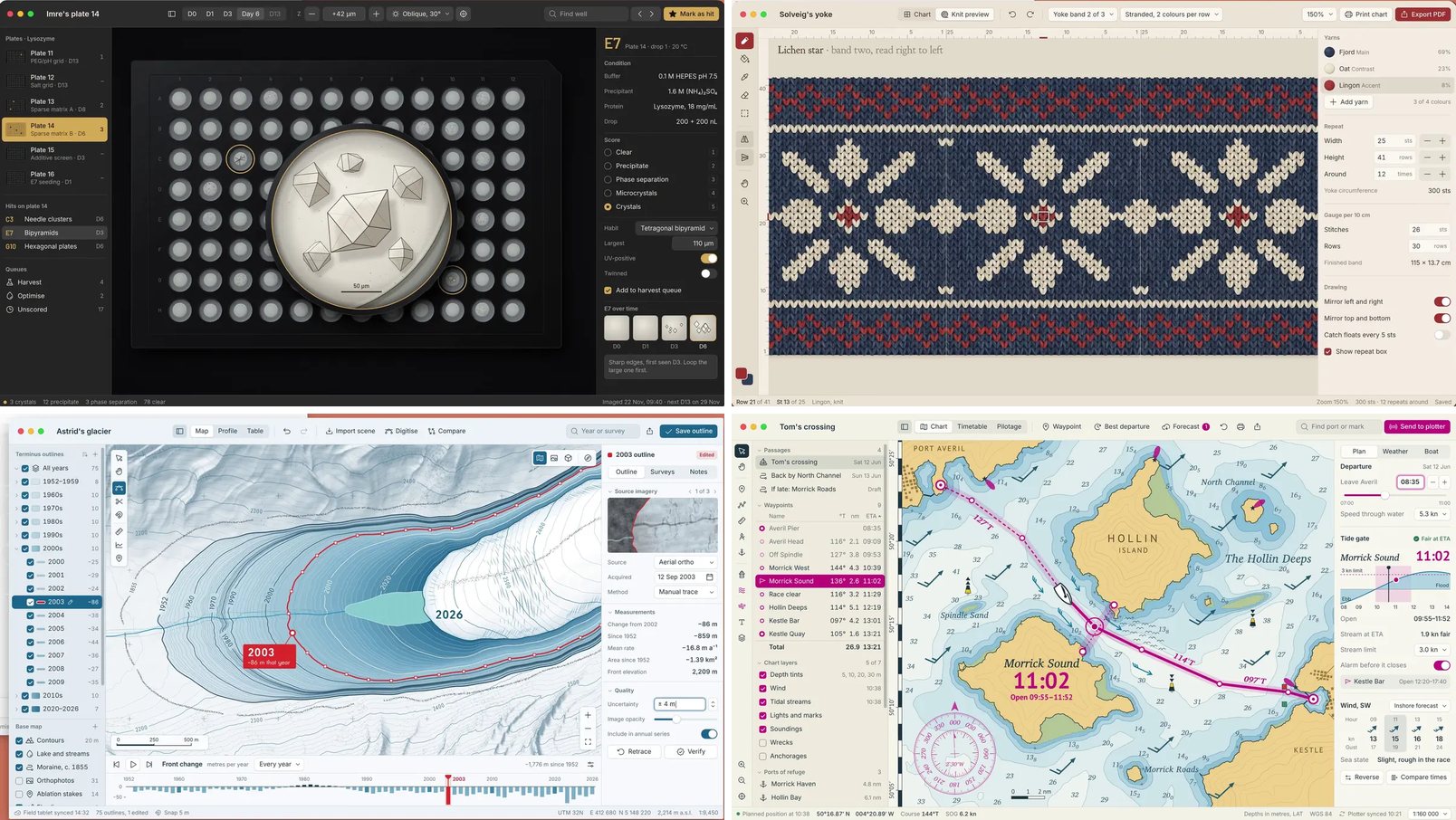
I looked at every screenshot to write those captions, and the set has a clear house style. Nearly every app is one dense window: a list of things on the left, a large drawing in the middle that is the point of the app, and an inspector on the right with the selected item's fields. The drawings are domain drawings, not dashboards: a crystallisation plate (4), a glacier front traced year by year (60), a sailing passage across a chart with a tide gate (61), a knitting chart (18), a contact sheet of negatives (30), a soil core per field (37). Many carry a small human workflow on the right edge: draft a reply and merge tickets (2), queue a crystal for harvest (4), nudge the person a purchase order is waiting on (34), notify a school principal (33).
What the screenshots can't show is anything that needs the new permissions. None of them shows a notification, a tray icon or a file being touched; each is a page that a browser could render. That fits the default tier, and it is also a fair reading of where most of the value is. The window and the icon matter because a tool you use every day should open like the rest of your apps. Whether the apps were each made from one prompt, or how long each took, the posts don't say.
WebMCP: a page hands the model its functions
The agent that operates a web page today usually does it the slow way: take a screenshot or read the accessibility tree, decide where to click, click, look again. WebMCP gives the page a way to skip that. The page registers JavaScript functions as tools, with names, descriptions and JSON Schemas, and an agent in the browser calls them.
The draft is a W3C community group report, and the version of 24 November puts the API on Document:
partial interface Document {
  [SecureContext, SameObject] readonly attribute ModelContext modelContext;
};
ModelContext has a provider half and a consumer half. The page calls registerTool(tool, { signal }) once per tool; aborting the signal unregisters it. A consumer, which is whatever agent the browser hosts, calls getTools() and executeTool(tool, inputObject, { signal }), which resolves to a string. A toolchange event fires when the set changes. Each tool can carry four annotations: readOnlyHint, untrustedContentHint (its output contains page text that may hold injected instructions), consequentialHint (it can do something that can't be undone) and debugging.
Until now the consumer had to be the browser's own agent. The AI SDK's new transport makes your own chat the consumer.
The AI SDK transport, from its source
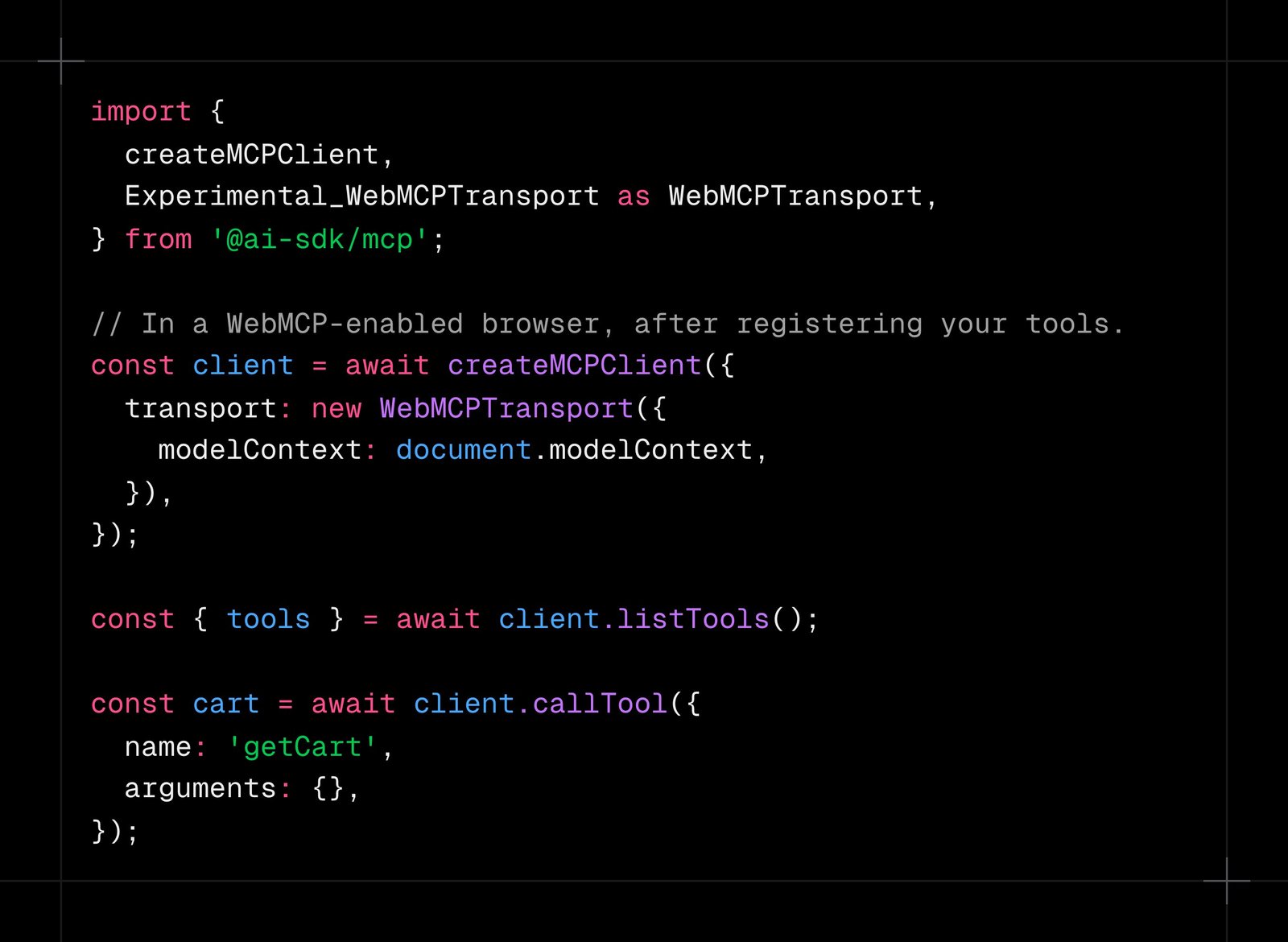
Experimental_WebMCPTransport arrived in @ai-sdk/mcp 2.0.104 (changelog entry 38646e7), with createMCPTools beside it. The transport is about 320 lines in packages/mcp/src/tool/webmcp-transport.ts, and reading it explains the design better than the docs do. It implements the same MCPTransport interface as the HTTP and stdio transports, but instead of sending JSON-RPC over a wire it answers the requests itself:
initializereturns a canned server description (serverInfo: { name: 'webmcp' }, a tools capability). There is no server to negotiate with.tools/listcallsmodelContext.getTools()and turns each WebMCP tool into an MCP tool. The name is capped at 64 characters and made unique; withfromOriginsset, every name gets a prefix built from a SHA-256 of its origin, so a tool from another site can't pose as yours by picking your tool's name. OnlyreadOnlyHintbecomes an MCP annotation. The full WebMCP annotations, includingconsequentialHint, travel under_meta['ai-sdk.dev/webmcp'].tools/calllooks the alias up and callsmodelContext.executeTool(tool, args, { signal }). The string that comes back is parsed as JSON and returned as both text content andstructuredContent. A tool that throws anOperationErrorbecomes anisErrorresult the model can read; a result that isn't JSON is an error.
The transport keeps a snapshot of the tool list. Its doc comment says to "list tools again after a WebMCP toolchange event." One reply under the AI SDK post asked exactly this, whether the client re-discovers when a cart page and a checkout page expose different tools. The cookbook's answer is to list tools before every request, which I'll come to.
Calling client.callTool from the page is the easy part. What the recipe does with it is decide where the model runs.
Model on the server, tools in the tab
The cookbook recipe is a shopping cart in Next.js, and it splits one chat across two machines. The page registers four tools on document.modelContext: getCart, addToCart, updateCartItem and removeFromCart. The model, and the API key, stay on the server. The browser carries the tools there and runs them when the model asks.
The browser's half is useChat with two hooks. Before each request it lists the page's tools and sends the definitions with the messages:
transport: new DefaultChatTransport({
  api: '/api/chat/webmcp',
  async prepareSendMessagesRequest({ messages }) {
    const { tools } = await client.current!.listTools();
    return { body: { messages, tools } };
  },
}),
The server turns the definitions into AI SDK tools with no execute function, so streamText can offer them to the model but cannot run them:
tools = createMCPTools(definitions);When the model emits a tool call, it streams back to the browser. onToolCall runs it through the MCP client, which goes through the transport to executeTool and into the page's own function, and addToolOutput attaches the result. sendAutomaticallyWhen: lastAssistantMessageIsCompleteWithToolCalls sends the conversation back to the server for the next step. Each step is one HTTP round trip and every tool call runs in the tab.
The widget runs that loop. The tools, a small modelContext with the draft's registerTool, getTools and executeTool, and the transport's mapping are real code on this page. The model is scripted, so each prompt always makes the same calls; the prompts and the products are the ones in shadcn's video. With the cookbook's tools, "add two mugs and a tote bag" takes three requests to the server: read the cart (the recipe's instructions say to read it first), two addToCart calls in one step, then the reply. "Place the order" ends with the model saying it can't, because the four tools don't include one. Switch to UI SDK's tools and the same prompt is one act call and a reply, and "place the order" stops at a button the page marked as needing a person.
Listing tools before every request answers the re-discovery question: the server always sees the tools the page has now. It also means the server is reading tool definitions that came from a client. A definition is a name, a description and a schema, and the description goes into the model's context. The recipe treats them as untrusted: it rejects more than 32 definitions, catches MCPClientError from createMCPTools and returns a 400, rejects attachments, and refuses any request that isn't from local development. Its last paragraph says to replace that guard with authentication "and apply your own policies to browser-supplied definitions and results" before deploying. I would go further for anything public. A user can edit what their own browser sends, so a deployed version should check the definitions against the list the page is known to register, not only their shape.
WebMCP also has to exist. The recipe needs chrome://flags/#enable-webmcp-testing and a relaunch, and it checks for document.modelContext.getTools and executeTool before connecting. Until browsers ship it, this is a pattern for people who control the browser.
"Zero tools written": three tools for the whole page
The phrase is accurate and easy to misread. A reply under the post put it well: it doesn't mean the model operates the page by itself; it means the components came with tool definitions and this demo added none. From the source, one call registers three tools for the entire app:
const agent = createAgent()
const unregister = registerTools(agent, {
  allow: (step) => step.action !== "press" || confirm(`Press ${step.args[0]}?`),
})
registerTools in packages/core/src/page/agent/agent.ts loops over agentTools and calls document.modelContext.registerTool for act, query and snapshot, with annotations set per tool: snapshot is read-only, all three carry untrustedContentHint because their results include text from the page, and act carries consequentialHint because "a step can press any button, including one whose action can't be undone." That last hint was added in a changeset after my first read of UI SDK. The allow callback is required, because "the browser's agent isn't one you wrote"; the AI SDK client is one more such agent. A button marked data-agent-confirm reaches allow with step.confirm, which is the dialog at the end of the video.
So the cart in the video has no addToCart. The model calls act with steps like { ref: "Mug quantity", action: "setValue", args: [2] }, and the bridge finds the number input by its label and calls its own API. This is the same bridge I measured on a settings form in November: 10 tool calls down to 2 and 9.6 s down to 3.7 s against generic browser tools. WebMCP only changes who can reach it.
The trade has a number on it. WindTunnel's reference patches, which I read in September, added 7,302 lines to expose 44 hand-written WebMCP tools across eight apps, about 166 lines per tool. The best of those tools encode a whole journey: one complete_checkout call that fills in the address, picks the only shipping option and places the order. UI SDK's three tools cost nothing to write and know nothing about checkout. The model has to plan the steps from labels, guided by an act description that runs to several hundred words. For a page built from ui-sdk components, I'd start with the three generic tools and write a specific one only where a task keeps failing or needs a single atomic call.
Where the two meet
Nothing in Anthropic's announcement says an installed artifact registers WebMCP tools or that Claude calls them, and I won't guess that it will. What the two launches share is a shift in what a web page is for. Install as app makes a page something you keep, with a window and permissions. WebMCP makes it something a model can operate through functions the page chose to expose. A page built with UI SDK and installed as an app would be both, with its permissions decided in two places: Claude's tiers for what the app may do to your machine, and allow for what any agent may do to the app.
That second boundary is the one I care about for Kaël, where agents draft documents that a person reviews in a React frontend. An allow callback plus a confirm attribute on the send button is a small amount of code for a boundary that matters. Reading the source, it is in the right place.
My position, plainly: Install as app is the bigger change for most people, and the permission design is better than I expected, apart from remote code that changes under a granted permission. WebMCP in the AI SDK is a clean transport for an API almost nobody can use yet. Build against it if you control the browser; otherwise watch for the flag to go away. UI SDK's three tools are the most useful idea of the three, because they make a page operable by a model without anyone writing tools for it.
A library of behaviors for agents to build the next generation of user interfaces.
- license
- Apache-2.0
- branch
- main
- forks
- 246
- open issues
- 141
- source
- 21.1 MB
- commit date
- 2026-11-24
Read at d5c6249 (24 November 2026): packages/core/src/page/agent/agent.ts (registerTools, agentTools) and apps/docs/content/docs/agents/connect-an-agent/webmcp.mdx.
GitHub REST API, 2026-11-24 — branch, commit, commitDate, createdAt, description, forks, homepage, license, openIssues, pushedAt, stars, topics
The AI Toolkit for TypeScript. From the creators of Next.js, the AI SDK is a free open-source library for building AI-powered applications and agents
- license
- custom
- branch
- main
- forks
- 5.7K
- open issues
- 1.7K
- source
- 40.0 MB
- commit date
- 2026-11-24
Read at a457990 (24 November 2026): packages/mcp/src/tool/webmcp-transport.ts, the @ai-sdk/mcp 2.0.104 changelog, the createMCPTools reference and the cookbook recipe content/cookbook/01-next/76-webmcp-tools.mdx.
GitHub REST API, 2026-11-25 — branch, commit, commitDate, createdAt, description, forks, homepage, languages, license, openIssues, pushedAt, stars, topics
What I read, and what I didn't run. The four posts and their threads and replies, through the fxtwitter mirror; Anthropic's announcement of 24 November; the WebMCP draft community group report dated 24 November 2026; @ai-sdk/mcp's transport source, changelog and createMCPTools reference at vercel/ai commit a457990; the AI SDK cookbook recipe; UI SDK's registerTools, agentTools and WebMCP docs at vercel-labs/ui commit d5c6249. I did not install an artifact as an app or run WebMCP in a browser. The gallery's captions are my descriptions of @nopsnek's screenshots. The cart widget's tools, modelContext and transport mapping run on this page; the model's calls are scripted.